Spec Loop — Design-First AI-Assisted Development
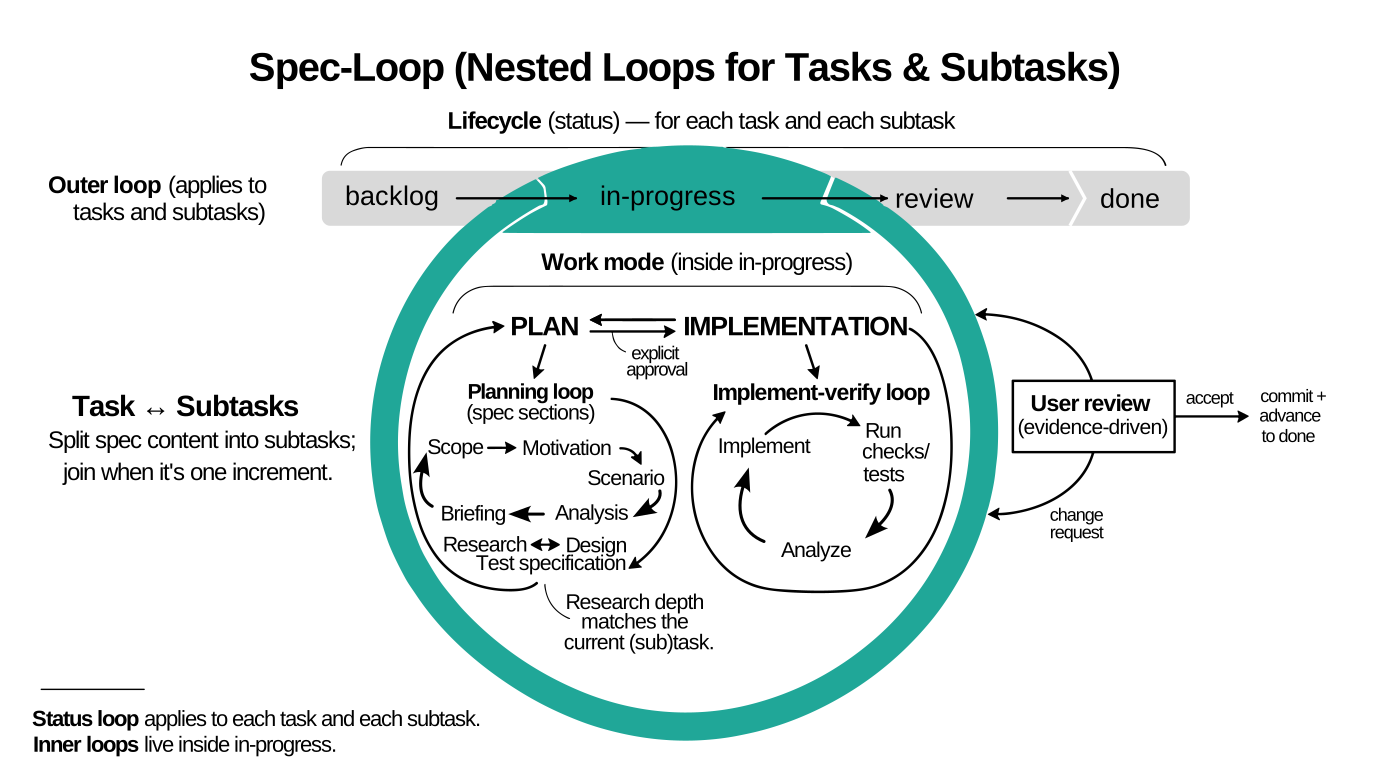
There are two common ways people use AI for coding.
Vibecoding: you describe intent, the model fills in the gaps, and you get a large diff with undocumented decisions. Review becomes archaeology. Tests are optional by accident.
Waterfall: you try to avoid that by writing a complete spec first. You can’t. Constraints appear during implementation. The spec inflates, then it either blocks change or gets ignored.
Spec Loop avoids both: write the next small spec, review it, then implement it with tests. Keep the spec local to the next step. Repeat until done.
Living project documents record current specifications, contracts, architecture, operations, shared language, and decisions. Spec Loop plans changes to affected documents with the code, completes them in the same increment, and includes them in review. Spec Loop does not require a project to create living documents when none are otherwise needed.
Projects with multiple living documents keep one list in an existing project instruction file or, by default, the root README. The list may point to individual documents or collections such as an arc42 document set. An existing project glossary remains active when it is the only living document.
When work is too large for one task, Spec Loop can use subtasks or multiple task files / backlog items. Implementation tasks and subtasks should be releasable unless the user explicitly opts out.
Spec Loop is a framework of reusable skills.
Living Project Documents
This section is this project's authoritative living-project-document list.
README.md is implicit because it contains the list.
AGENTS.md— project instructions; repository-wide agent rules.skills/— normative skill collection; Spec Loop workflow, format, and lifecycle behavior.docs/— user-facing documentation collection; explanations, governance, comparisons, studies, and tutorials.site/— documentation publication collection; site navigation and build behavior.
Getting Started
Install the skills with npx skills
Recommended path:
Install the core task-workflow skills together.
Ensure Node.js is available so npx works.
Install Spec Loop in the current project with:
npx skills add dpolivaev/spec-loop -s '*'
Variations:
-s '*'installs all shipped skills.- Remove
-s '*'to select skills interactively instead of installing the full bundle. That lets you skip the optional spec-loop-setup-doc-rendering and spec-loop-review-change skills, and skip spec-loop-write-glossary when your project will not use a project glossary. - Add
-gfor a global install. - Use
-g --allfor a global, non-interactive install for all supported agents.
For selective, single-agent, or other installation variants, see https://github.com/vercel-labs/skills.
Prepare task and glossary rendering
Spec Loop task files use embedded PlantUML diagrams and may also include Mermaid visual glossaries. Spec Loop project glossaries may include Mermaid diagrams. Prepare your editor for reviewing rendered task files and glossary files before continuing.
Ask the agent to use the spec-loop-setup-doc-rendering skill to prepare your editor preview setup.
If you do not want to use the skill and prefer manual setup, use these editor-specific references: VS Code-Based IDE Setup and JetBrains Setup Reference.
For example:
Please use the `spec-loop-setup-doc-rendering` skill to help me
prepare my editor for reviewing rendered Spec Loop task files and
glossary files.

My coding harness may run in a terminal, but I review files in
<VS Code, Cursor, another VS Code-based IDE, or JetBrains>.
When an end-to-end rendering check is useful, the skill should also suggest small Markdown and AsciiDoc probe files that exercise the relevant diagram types, including a class diagram.
If you review files in VS Code, Cursor, or another VS Code-based IDE,
the same extension IDs and settings apply. When your editor exposes a
supported CLI command, you can also run the helper script directly
instead of asking an agent to use the skill. You can either run it from
a local checkout or download the current main-branch copy directly from
setup-vscode-server-based.sh.
The script requires a supported editor CLI command on PATH (code,
code-insiders, cursor, code.cmd, code-insiders.cmd, or
cursor.cmd) and is intended for macOS, Linux, WSL, and Git Bash for
Windows. Other VS Code-based IDEs should apply the same extension IDs
and settings manually.
The helper automates only the server-based PlantUML preview path for supported VS Code-based IDEs together with the AsciiDoc extension used by Spec Loop glossaries. It does not automate the local-only PlantUML path or JetBrains setup.
From a local checkout:
bash skills/spec-loop-setup-doc-rendering/scripts/setup-vscode-server-based.sh --check
bash skills/spec-loop-setup-doc-rendering/scripts/setup-vscode-server-based.sh --apply
Without a local checkout:
curl -fsSLO https://raw.githubusercontent.com/dpolivaev/spec-loop/refs/heads/main/skills/spec-loop-setup-doc-rendering/scripts/setup-vscode-server-based.sh
bash setup-vscode-server-based.sh --check
bash setup-vscode-server-based.sh --apply
How to update
Project-level update:
npx skills update
Global update:
npx skills update -g
Manual fallback when npx is unavailable
If npx is not available, clone or download this repository and copy
the core task-workflow skills from skills/ into your agent's skills
directory. Keep that core bundle together:
- spec-loop-plan-task
- spec-loop-plan-work-breakdown
- spec-loop-clarify-task
- spec-loop-prepare-execution-approval
- spec-loop-implementation-flow
- spec-loop-write-adr
Install spec-loop-write-glossary when your project uses a project glossary.
Install spec-loop-setup-doc-rendering only if you want rendering setup or troubleshooting help.
Install spec-loop-review-change only if you need review of an existing change, whether as a high-level assessment, a file-wise walk-through, or both.
Which directory your agent uses is agent-specific. See https://github.com/vercel-labs/skills for agent-specific installation details.
Further Reading
- How Spec Loop Works — why the workflow scales to large codebases.
- Skills Overview — the skill catalog, reading path, and reference links.
- Diagram and Rendering Policy — PlantUML default, Mermaid fallback, and rendering guidance.
- Governance, Review, and Traceability — approval boundaries, review discipline, and traceability rules.
- AI Workflow Framework Comparison — workflow trade-offs compared with other frameworks.
- Tutorials:
License
Licensed under the MIT License. See LICENSE.
Origin
This framework was developed and applied in Freeplane.
How Spec Loop Works
Spec Loop follows this workflow:
- clarify - spec-loop-clarify-task resolves material unresolved questions before or during planning.
- plan - the spec-loop-plan-task bundle governs plan-first work, including planning-form selection, the fileless planning path in chat, the task-file path when needed, ADR and other documentation routing, Scenario and task Glossary triggers, and the gate before execution.
- break down work - after planning-form selection chooses subtasks or multiple task files / backlog items, spec-loop-plan-work-breakdown governs file-based decomposition and requires implementation tasks and subtasks to be releasable by default.
- approve - you approve either a fileless task in chat or a task-file plan; on the task-file path, spec-loop-prepare-execution-approval prepares the task for that approval step.
- execute implementation - after execution approval for implementation work on either planning path, spec-loop-implementation-flow governs code, tests, and approved actions for affected living project documents.
- execute investigation - after execution approval for
investigation work, the active task records reviewed output in
Findingsand is presented or moved toreview. - review/ready - spec-loop-implementation-flow governs
implementation work's move to
reviewon the task-file path and readiness reporting on the fileless path.
The planning and approval rules for that workflow live in the spec-loop-plan-task bundle and its companion files. File-based work breakdown rules live in spec-loop-plan-work-breakdown.
The planning bundle starts with SKILL.md, planning-form-selection-guidance.md, and common-task-guidance.md. When Scenario or task Glossary work is needed, it also uses scenario-and-glossary-guidance.md, plus chat-only-path-guidance.md on the chat-only path and task-file-path-guidance.md on the task-file path.
The spec-loop-write-glossary skill defines the Spec Loop AsciiDoc project glossary format in glossary-format.md.
The spec-loop-setup-doc-rendering skill helps users prepare and troubleshoot rendering for task files and glossary files. If a user does not want to use the skill directly, see vscode-setup.md and jetbrains-setup.md for manual editor-specific setup references.
The spec-loop-review-change skill is optional. It reviews existing changes from local or trusted sources. It can produce a high-level assessment, a file-wise walk-through, or both.
The model uses these skills while drafting and updating plans, task,
or review artifacts; you review and approve either a fileless chat
task or a task-file plan before execution. Approved implementation
then continues under spec-loop-implementation-flow.
On task-file implementation work, it governs implementation-time
routing, Implementation notes, and the move to review. On the
fileless path, it governs canonical chat-task maintenance, recovery
re-emission or promotion, and readiness reporting. When the code
already exists, you inspect a retrospective walk-through or assessment
instead.
Spec Loop also defines explicit work phases: PLAN, EXECUTION, and DONE. Transitions to EXECUTION and DONE require explicit user approval.
During planning, active task artifacts may use Scenario and task
Glossary sections to ground behavior and extract task-local terms.
On the task-file path this means task files. On the chat-only path
this means the canonical chat-only task kept in chat.
When a project maintains a glossary described by the shared task semantics project glossary section, that project glossary defines the shared domain language above individual tasks and the code. It keeps design documents, tests, code symbols, and commit text aligned on the same terms across the whole project.
If no project glossary exists yet, current domain language comes from
Research plus the existing codebase until one is created.
Consistent reuse of approved terms across the shared glossary source,
Scenario, Design, and Test specification keeps meaning,
behavior, design contracts, and verification aligned. When a proposed
term means the same thing as an existing abstraction, Spec Loop reuses
the current name or requires an explicit proposal to rename or
restructure that abstraction.
Spec Loop is designed to work with existing codebases at scale. Before detailed design or implementation, the model captures relevant knowledge in Research for the current task, or for the current subtask plus needed task-level context when subtasks are in use: existing behavior, constraints, APIs, interfaces, and established code practices.
It follows the classic research–plan–implement approach, broken down into small, reviewable tasks and subtasks.
The research is explicitly scoped to the current task, or to the current subtask plus needed task-level context when subtasks are in use. It captures only what is required to implement that scope correctly, and is intentionally partial. The result is a bounded, reviewable understanding whose size remains manageable.
For large codebases, task Glossary sections and the project glossary
are especially useful because they keep domain terms stable across
many tasks, subtasks, files, and subsystems.
Because the scope can be kept reasonably small and the research is written down, you can verify that the model examined the right parts of the codebase, identified the correct interfaces, and aligned with existing practices before any code is written. This is especially valuable in legacy systems: it prevents clean-room redesigns and makes incremental change safer.
Document Types and Lifetimes
Spec Loop uses more than one document type on purpose. They do not have the same job or the same lifetime.
- Fileless chat tasks are short-lived canonical chat artifacts for simple work on the fileless path. They exist to drive research, implementation, and verification without task-file overhead. If alignment becomes unsafe, they are re-emitted or promoted to task files.
- Task files are short-lived working artifacts for the next concrete
task on the task-file path, or for the current subtask plus needed
task-level context when a task uses subtasks. They exist to drive
research, review, implementation, and testing for that scope. When
needed, they may also include
Scenarioand taskGlossarysections. - Living project documents capture current truth that should remain useful after the task is accepted. They include specifications, API contracts, architecture and operations documents, current ADRs, and project glossaries. ADRs preserve durable decisions and their reasons. A project glossary preserves shared language across tasks, design, tests, code symbols, and commits.
- Documentation-only work may stand on its own when no implementation change is involved and no project rule requires a task file.
- Review files reconstruct and assess already-implemented work from trusted pull requests, merge requests, or commit ranges. When needed, they may also produce GitHub-friendly Mermaid variants for sharing the review.
Spec Loop does not require a project to have living project documents. When none are otherwise needed, the project does not need to create documents or a list for workflow compliance.
Projects with multiple living project documents keep one list named
Living Project Documents in an existing project instruction file or, by
default, the root README. The file containing the list is implicit. The
list may identify individual documents or collections such as an arc42
document set. If an existing project glossary is omitted while other
living documents are listed, the model asks how to handle it. When a
project glossary is the only living document, it remains in use without
requiring a list. Planned document actions update, create, or supersede;
ADR actions follow the ADR lifecycle.
Historical task files do not need to be kept mutually consistent across time. The active task artifact, however, should stay aligned with applicable living project documents and implemented code for its scope.
If a project maintains a technical design document, its purpose is to describe the current technical shape, stable boundaries, and important flows. It should not become a second glossary or a catalog of transient implementation detail.
Governance, Review, and Traceability
This document defines the governance, review, and traceability rules around Spec Loop work.
What the workflow rules, common task guidance, and task-file path guidance enforce
The workflow rules are the normative contract between the human
developer and the model. common-task-guidance.md defines the shared
no-subtask task form used on both planning paths. When Spec Loop uses
a task file, the task-file path guidance adds task-file-only mechanics.
Together, they enforce at minimum:
- Explicit planning before implementation work.
- A fileless planning path in chat only for first-pass, straight-line work with lightweight research, a single clear implementation path, lightweight verification, no existing task file, and no need for subtasks or diagrams.
- One shared main-task structure and section semantics across both planning paths, with task-file-only additions for subtasks, lifecycle, and diagrams.
- Task files as the source of truth for scope, constraints, research,
design, test expectations, and execution status when the task-file
path is in use, plus
Implementation noteswhen meaningful implementation-time history must remain visible. - Implementation tasks and subtasks are releasable by default: each one must be independently implementable, verifiable, reviewable, and acceptable unless the user explicitly opts out.
- A canonical fileless chat task as the source of truth on the fileless path, allowing an initial task with only the established sections, then section-only chat updates and full-task recovery re-emission when reconstruction confidence drops.
- ADRs and other documentation may stand as their own planning artifacts when they are the requested work and no task-file rule overrides that.
- One living-project-document list in project instructions or the root README when the project has multiple living documents, with entries for individual documents or collections.
- A default approval gate before any code, test, or configuration changes, with either fileless-task approval on the fileless path or task-file approval on the task-file path.
- A separate post-approval implementation skill on both planning
paths. On the task-file path it governs implementation-time
clarification, task maintenance, and the move to
review. On the fileless path it governs canonical chat-task maintenance, implementation-time clarification, recovery or promotion, and readiness reporting. - Implementation completeness: the approved design is implemented, applicable constraints are met, required living-project-document actions are complete, and the test specification is implemented unless tests are waived.
- Review includes each completed living-project-document action, its resulting files, and required implementation-note traceability.
- Traceability discipline: identifiers in commit messages, and status/folder consistency where task files are in use.
If a local convention conflicts with the applicable workflow rules or Task-file Path Guidance, the governing rule wins.
The human developer’s role
A central assumption of Spec Loop is that the human developer remains the primary source of understanding and intent.
The model is treated as a powerful implementation and reasoning aid that operates under explicit constraints, not as an independent decision-maker.
The developer is responsible for judging correctness, scope, and relevance. The model operates within the boundaries defined by the approved plan and requires explicit approval to cross implementation gates. On the task-file path, the task file is the source of truth for that approved plan.
Task files as present truth
A task file is not a general historical narrative. It is the stabilized description of what must be true now to implement the active task correctly, or the current subtask plus needed task-level context when subtasks are used.
Practically:
- Research records observations and verified facts only.
- Constraints record binding limits for the active task, or for the current subtask plus needed task-level context when subtasks are used.
- Design records the approved target design intent for the active task, or for the current subtask plus needed task-level context when subtasks are used.
- Test specification defines the verification that must exist for completion.
- Implementation notes, when present, keep only the bounded implementation-time decision trail that later review needs.
History still belongs primarily in version control. Implementation notes is the narrow exception for implementation-time decisions that
would otherwise be lost. The task file still represents the current
intent.
Constraints as a control layer
When a task includes Constraints, they capture the limits that the target design and implementation must obey.
Typical examples are semantic invariants, non-goals, compatibility limits, identity rules, performance limits, and forbidden simplifications.
If Design conflicts with Constraints, Constraints wins.
Briefing as a soft entry point
Each current or implementation-ready task includes a Briefing section that serves as a soft entry point. Initial backlog tasks and subtasks created by spec-loop-plan-work-breakdown may omit Briefing until they become current.
Briefing is for:
- someone unfamiliar with the codebase,
- the contributor returning to the task after time has passed,
- onboarding new contributors.
The briefing explains what matters, where to look first, and which modules, classes, and stack decisions orient a newcomer quickly.
It is not a summary of the task history. It is a guide for understanding the current intent.
Approval boundaries
Spec Loop has two planning approval surfaces:
- Fileless planning-path approval in chat.
- Task-file approval on the task-file path.
On the fileless planning path, the model must ask the user to approve both skipping task-file creation and implementing from the fileless chat task.
On the task-file path:
- The model may edit task files without prior approval.
- If task files were edited and there is no execution directive, the model must request user review before changing code, tests, or configuration.
- An explicit directive such as “implement”, “investigate”, “go ahead”,
“proceed”, or “apply” counts as
PLAN -> EXECUTIONapproval only when the active task is ready and the directive clearly refers to that task. If readiness or the referent is unclear, ask. - After task-file execution approval for implementation work,
spec-loop-implementation-flow governs implementation-time
clarification, the post-implementation
Implementation notescheckpoint, and the move toreview. - After task-file execution approval for investigation work, the active
task records reviewed output in
Findingsand moves toreview.
On the fileless path, after fileless execution approval for implementation work, spec-loop-implementation-flow governs implementation-time clarification, canonical chat-task updates, full-task recovery re-emission when needed, promotion to the task-file path when fileless simplicity no longer holds, and readiness reporting.
If implementation stays within the approved design and only bounded clarification is needed, the canonical task artifact is updated in place and work continues. If scope or another approved contract changes materially, the model proposes next steps and requests renewed approval before continuing.
Phase model
Spec Loop defines work phases: PLAN, EXECUTION and DONE.
By default, phase transitions are constrained:
PLAN -> EXECUTIONrequires explicit approval.EXECUTION -> DONErequires explicit approval.- Any new request, refinement, extension, or follow-up resets work to
PLAN.
This keeps the model aligned and prevents implementation from continuing by inertia after scope changes.
Review boundaries that map to normal practice
Spec Loop separates agreement on intent from review of implementation. Even with simplified statuses, review gates still exist at the execution-approval boundary, at the task-file-path move-to-review boundary when that path is in use, and at final completion approval.
Reviewers assess correctness against approved intent.
PlantUML as a design artifact
The task-file path guidance requires Design sections on the task-file path to use PlantUML diagrams that model structure or flow (class, component, sequence), with strict formatting rules.
Design remains reviewable as a first-class artifact and is not encoded only in implementation.
Traceability mechanics
Spec Loop makes intent recoverable after the fact:
-
Task files define the intent boundary for a set of commits when the task-file path is in use.
-
Fileless tasks define the intent boundary in chat while the fileless path remains active.
-
Commit messages are structured artifacts and must start with the Primary Identifier:
- Ticket ID when present, otherwise the Task Identifier.
This links implementation changes to an explicit, reviewable specification.
Status folders and lifecycle discipline
On the task-file path, work is organized by status folders in the task directory:
- backlog: planned or deferred work; initial backlog tasks and subtasks created by spec-loop-plan-work-breakdown may contain only title, Scope, and Motivation until they become current.
- in-progress: active research, design, implementation, or verification; subtasks carry explicit status.
- done: user-verified completion; prefix rules preserve ordering.
Before commits on the task-file path, the model validates task status consistency and proposes folder or status updates. These are applied only after explicit user confirmation, unless the user explicitly instructed to commit.
Definition of done in team context
Completion is not inferred from working code.
A task or subtask is considered done only when:
- the approved design is fully implemented,
- the test specification is implemented and passing,
- any deviations are documented in the active task artifact,
- required living-project-document actions are complete and included in review,
- the user explicitly approves the transition to done.
This applies equally to human-written and model-written code.
Architecture Decision Records
Use ADRs for decisions that outlive a single task, such as public behavior, dependencies, or long-term design.
ADRs capture context, decision, and consequences without turning task files into long-lived design encyclopedias.
Skills Overview
Included Skills
This repository currently ships these skills:
- The core task-workflow bundle is spec-loop-plan-task, spec-loop-plan-work-breakdown, spec-loop-clarify-task, spec-loop-prepare-execution-approval, spec-loop-implementation-flow, and spec-loop-write-adr.
- spec-loop-write-glossary is required when a project uses a project glossary in the Spec Loop AsciiDoc format.
- spec-loop-setup-doc-rendering and spec-loop-review-change are optional.
-
- the planning and task-administration skill for non-trivial work;
- defined by skills/spec-loop-plan-task/SKILL.md, skills/spec-loop-plan-task/planning-form-selection-guidance.md, skills/spec-loop-plan-task/common-task-guidance.md, skills/spec-loop-plan-task/scenario-and-glossary-guidance.md when Scenario or task Glossary work is needed, skills/spec-loop-plan-task/chat-only-path-guidance.md on the chat-only path, and skills/spec-loop-plan-task/task-file-path-guidance.md on the task-file path.
-
- the file-based work breakdown skill used after planning-form
selection chooses
task file with subtasksormultiple task files / backlog items; it enforces standalone tasks and subtasks, with implementation tasks and subtasks releasable by default, and requires explicit user opt-out for non-releasable implementation work; - defined by skills/spec-loop-plan-work-breakdown/SKILL.md.
- the file-based work breakdown skill used after planning-form
selection chooses
-
- the clarification skill for underspecified task creation, task updates, design updates, and ADR decisions; preferred over generic grill-me variants in Spec Loop workflows;
- defined by skills/spec-loop-clarify-task/SKILL.md.
-
spec-loop-prepare-execution-approval
- the approval-preparation skill used only on the task-file path before the agent asks for execution approval for implementation or investigation work within the spec-loop-plan-task workflow;
- defined by skills/spec-loop-prepare-execution-approval/execution-approval-guidance.md.
-
- the mandatory implementation-flow skill used after execution approval for implementation work on either planning path when implementation deviates from the approved task, when uncertainty or blocking questions arise, or before handing implemented work over for review or ready-state presentation;
- defined by the shared core skills/spec-loop-implementation-flow/implementation-flow-guidance.md, plus the path-specific companions skills/spec-loop-implementation-flow/chat-only-path-guidance.md and skills/spec-loop-implementation-flow/task-file-path-guidance.md.
-
- the skill for creating, updating, or superseding a Spec Loop AsciiDoc project glossary;
- defined by skills/spec-loop-write-glossary/glossary-format.md.
-
- the optional setup and troubleshooting skill for rendering task files and glossary files.
-
- the ADR-writing skill used when planning sends work to an architecture decision record or when the user asks for ADR work;
- defined by skills/spec-loop-write-adr/SKILL.md and skills/spec-loop-write-adr/adr-format.md.
-
- the optional existing-change review skill for pull requests, merge requests, branch diffs, commit ranges, local branch changes, or agent-written code the user wants reviewed; high-level assessments check required living-project-document actions, and file-wise walk-through mode explains the changed files;
- defined by skills/spec-loop-review-change/SKILL.md, skills/spec-loop-review-change/review-core-guidance.md, skills/spec-loop-review-change/assessment-guidance.md, skills/spec-loop-review-change/walk-through-guidance.md, and skills/spec-loop-review-change/github-gitlab-evidence-guidance.md.
Documentation
-
Check the planning, clarification, and implementation-flow skills briefly.
- skills/spec-loop-plan-task/SKILL.md defines first classification, approval and escalation rules, ADR and documentation routing, Scenario/task Glossary triggers, and phase rules.
- skills/spec-loop-plan-task/planning-form-selection-guidance.md
defines planning-form selection across
taskless,chat-only task,task file,task file with subtasks, andmultiple task files / backlog items. - skills/spec-loop-plan-work-breakdown/SKILL.md defines file-based work breakdown after subtask or multi-task planning forms are selected, including the default rule that implementation tasks and subtasks must be releasable unless the user explicitly opts out.
- skills/spec-loop-clarify-task/SKILL.md defines how Spec Loop clarifies underspecified task creation, task updates, design updates, and ADR decisions during planning or ADR writing.
- skills/spec-loop-plan-task/common-task-guidance.md defines the shared no-subtask task form, section semantics, readiness rules, formatting, testing policy, and task rules for the project list and for project glossaries and other living project documents.
- skills/spec-loop-plan-task/scenario-and-glossary-guidance.md
defines how task
Scenarioand taskGlossaryare drafted, how terms are checked for semantic identity with existing abstractions, and how task visual glossaries should be written. - skills/spec-loop-plan-task/chat-only-path-guidance.md defines the chat-only-path planning mechanics: initial canonical chat-task expression, section-only updates, recovery re-emission, later-work relation handling, and promotion to the task-file path.
- skills/spec-loop-plan-task/task-file-path-guidance.md defines the task-file-specific rules: task files, lifecycle and traceability requirements, subtasks, and diagram rules.
- skills/spec-loop-prepare-execution-approval/execution-approval-guidance.md defines task-file approval-readiness preparation before execution approval.
- skills/spec-loop-implementation-flow/implementation-flow-guidance.md
defines the shared implementation-flow core: post-approval route
semantics, canonical-section authority, shared
reviewmeaning,Implementation notes, and the semantic completion checklist. - skills/spec-loop-implementation-flow/chat-only-path-guidance.md
defines the chat-only-path implementation-time mechanics:
canonical chat updates, recovery re-emission, promotion, and
chat-only expression of
review. - skills/spec-loop-implementation-flow/task-file-path-guidance.md
defines the task-file-path implementation-time delta:
authorized task-file edits, task-file
Implementation notesexpression, and task-file expression ofreview.
-
Study the Wordle example by commit history.
- The Wordle commit history shows the workflow under real version-control pressure: how task specifications evolve step by step, and how implementation and tests follow approved design.
-
Check Governance, Review, and Traceability. It explains how fileless chat tasks, task files, workflow rules, common task guidance, and the task-file path guidance map to team development practice: boundaries, responsibility, commit linking, and status discipline.
-
Compare framework trade-offs.
- AI Workflow Framework Comparison compares Spec Loop with OpenSpec, Superpowers, grill-with-docs, and agent-skills by workflow purpose and cost.
-
Follow one of the hands-on tutorials.
- Wordle Tutorial walks through a compact Java example with staged planning, approvals, implementation, glossary maintenance, and testing.
- Online Art Game Tutorial walks through a complete browser-oriented example with staged planning, approvals, implementation, and testing.
- The two tutorials teach the same Spec Loop workflow: planning first, explicit approval before execution, small reviewable tasks or subtasks, verification, and user correction when the LLM misses a supporting update. The main difference is the technical setting: Wordle is a compact Java path, while the online art game is browser-oriented. You can choose either tutorial.
-
Project glossary conventions.
- See the planning skill's project-list and project-glossary
sections, plus the common task guidance, for glossary planning and
the fallback to
Researchplus the existing codebase when no project glossary exists. - skills/spec-loop-write-glossary/glossary-format.md is the shared project-glossary-format guidance file.
- Companion glossary examples live under skills/spec-loop-write-glossary/examples/.
- See the planning skill's project-list and project-glossary
sections, plus the common task guidance, for glossary planning and
the fallback to
Recommended quick-check order:
- README.md
- skills/spec-loop-plan-task/SKILL.md
- skills/spec-loop-plan-task/planning-form-selection-guidance.md
- skills/spec-loop-plan-work-breakdown/SKILL.md
- skills/spec-loop-clarify-task/SKILL.md
- skills/spec-loop-plan-task/common-task-guidance.md
- skills/spec-loop-plan-task/scenario-and-glossary-guidance.md
- skills/spec-loop-plan-task/chat-only-path-guidance.md
- skills/spec-loop-plan-task/task-file-path-guidance.md
- skills/spec-loop-prepare-execution-approval/execution-approval-guidance.md
- skills/spec-loop-implementation-flow/implementation-flow-guidance.md
- skills/spec-loop-implementation-flow/chat-only-path-guidance.md
- skills/spec-loop-implementation-flow/task-file-path-guidance.md
- docs/review-responsibility-and-traceability.md
- docs/skill-framework-comparison.md
- docs/online-art-game-tutorial.md
- docs/wordle-tutorial.md
Diagram and Rendering Policy
Spec Loop treats diagrams as specification artifacts: they make design intent reviewable at the same boundary as the surrounding text.
Where the task-file path guidance requires diagrams in task files, use PlantUML by default.
Mermaid is a poorer but still possible alternative when the User or another governing instruction explicitly prefers Mermaid, for example when GitHub or similar environments are used and PlantUML is not rendered.
PlantUML remains the recommended default in practice because it is usually easier to keep precise and reviewable for the structural and behavioral design work used in Spec Loop.
For inline PlantUML rendering in Markdown on the web, view the repo on GitLab. GitHub does not render PlantUML embedded in Markdown natively, so reading there can degrade the intended experience.
For local preview setup, use the spec-loop-setup-doc-rendering skill. If you do not want to use the skill and prefer manual setup, use these editor-specific references: VS Code-Based IDE Setup and JetBrains Setup Reference.
AI Workflow Framework Comparison
Relative-fit comparison of AI workflow frameworks. Rows are actions or workflow goals ordered roughly by when they appear in the software-development cycle.
The stars show how strongly the reviewed materials support each activity for LLM use, based on the specificity, operational clarity, and enforcement visible in the documents. They are not formal benchmark results or a full real-world performance score.
- ★★★★★ = strongest support
- ★★★★ = strong support
- ★★★ = meaningful secondary support
- ★★ = limited but real support
- ★ = weak / indirect support
- - = not a purpose there, or not evidenced in the materials reviewed
Frameworks compared
- OpenSpec — repo-local change/spec system with proposal, specs, design, tasks, verify, and archive flow.
- Superpowers — full coding-agent methodology with design gates, task planning, TDD, subagents, worktrees, and closeout workflows.
- Spec Loop — governed task/subtask workflow with explicit research, context-building, approval, and implementation control.
- grill-with-docs — clarification skill with strong domain-language pressure, contradiction surfacing, and optional inline glossary/ADR capture.
- agent-skills — broad engineering workflow library with strong anti-rationalization and verification patterns.
Some start with a broad problem or idea. Others start with a specific task that is already chosen.
- OpenSpec and Superpowers start earlier from a broader problem, idea, or change and then move toward spec/design/tasks/implementation.
- Spec Loop is strongest once work has a concrete direction and you want explicit planning-form selection, research, alignment, approval, and governed implementation. It can split larger work into subtasks or multiple task files / backlog items, but it is still less focused on broad problem discovery than OpenSpec or Superpowers.
- grill-with-docs is mainly a clarification and shared-language component, not a full end-to-end SDLC framework.
- agent-skills spans many stages, but less as one integrated artifact model.
1. Upstream discovery and scoping
| Action / purpose | OpenSpec | Superpowers | Spec Loop | grill-with-docs | agent-skills |
|---|---|---|---|---|---|
| Analyze a broad problem area before choosing implementation work | ★★★★★ | ★★★★★ | ★★ | ★★ | ★★★★ |
| Clarify a specific requested task or change before implementation | ★★★ | ★★★★ | ★★★★★ | ★★★★★ | ★★★★ |
| Split a broad initiative or change into smaller deliverable tasks or parts | ★★★★ | ★★★★★ | ★★★★ | ★ | ★★★★ |
2. Shared language and durable decision context
| Action / purpose | OpenSpec | Superpowers | Spec Loop | grill-with-docs | agent-skills |
|---|---|---|---|---|---|
| Challenge proposed terms against existing shared language and surface terminology conflicts | ★ | ★ | ★★★★ | ★★★★★ | ★ |
| Maintain a shared project glossary / terminology | ★ | - | ★★★★★ | ★★★★★ | ★ |
| Model multiple domains/contexts and their boundaries | ★★ | - | ★ | ★★★★★ | - |
| Surface and record architecture decisions that need durable rationale | ★★★ | - | ★★★ | ★★★★ | ★★★★ |
3. Define the intended change
| Action / purpose | OpenSpec | Superpowers | Spec Loop | grill-with-docs | agent-skills |
|---|---|---|---|---|---|
| Create durable spec/change artifacts that remain the source of truth | ★★★★★ | ★★★★ | ★★★★ | ★★ | ★★★★ |
| Write detailed technical design before implementation | ★★★★★ | ★★★★★ | ★★★★★ | ★★ | ★★★ |
| Make current and target structure/behavior explicit with reviewable diagrams | ★ | ★ | ★★★★★ | ★ | ★ |
| Maintain brownfield deltas between current and proposed behavior | ★★★★★ | - | ★ | - | - |
4. Make the next implementation step ready
| Action / purpose | OpenSpec | Superpowers | Spec Loop | grill-with-docs | agent-skills |
|---|---|---|---|---|---|
| Make one implementation step ready by explicitly capturing research, constraints, design, and test expectations | ★★★ | ★★★★ | ★★★★★ | ★★★ | ★★★ |
| Break approved work into actionable implementation tasks/checklists | ★★★★★ | ★★★★★ | ★★★★ | ★ | ★★★★ |
| Support lightweight planning for one simple implementation step without opening a full formal artifact workflow | ★★ | ★ | ★★★★★ | ★★ | ★ |
5. Govern implementation while coding
| Action / purpose | OpenSpec | Superpowers | Spec Loop | grill-with-docs | agent-skills |
|---|---|---|---|---|---|
| Keep implementation constrained to the approved task or change during coding | ★★★★ | ★★★★★ | ★★★★★ | - | ★★★ |
| Use explicit guardrails against rationalization and unjustified confidence during execution | ★ | ★★★★★ | ★★★ | ★ | ★★★★★ |
| Treat test-first development as a required implementation method | ★ | ★★★★★ | ★★ | - | ★ |
| Require root-cause analysis before fixes when debugging | - | ★★★★★ | - | - | - |
| Use subagents plus review loops as a primary implementation strategy | - | ★★★★★ | - | - | ★ |
| Use isolated development workspaces/branches as part of the normal implementation flow | ★ | ★★★★★ | - | - | - |
| Coordinate implementation across multiple repos or linked workspaces | ★★★★★ | - | - | - | - |
6. Verify and close out
| Action / purpose | OpenSpec | Superpowers | Spec Loop | grill-with-docs | agent-skills |
|---|---|---|---|---|---|
| Check implemented work against the agreed artifacts before calling it done | ★★★★ | ★★★★★ | ★★★★★ | - | ★★★★ |
| Assess pull requests, merge requests, or diffs and prepare review artifacts | ★ | ★★★★ | ★★★★★ | - | - |
| Drive merge or branch-closeout as an operational workflow step | - | ★★★★★ | - | - | - |
| Preserve completed change context in an archive or other durable historical record | ★★★★★ | ★ | ★★ | - | - |
7. Workflow costs
This is a different kind of comparison. Lower is not automatically better: a framework can be cheaper here because it covers less of the job, or because it keeps less written state.
These cost labels are comparative judgments based on the reviewed materials, not measurements or benchmark results.
Activities
- Before coding = the cost of clarification, specification, design, planning artifacts, and approvals before implementation starts.
- Coding and testing = the cost once the next task or change is already chosen: coding mechanics, testing method, review loops, and implementation-time clarification.
- Maintaining authoritative written artifacts as the system grows = the cost of keeping specs, glossary files, ADRs, or similar written artifacts believable as the codebase and behavior evolve.
- Repeated research and re-alignment per implementation step = the cost of re-checking current truth and rebuilding enough local context for each new task or change.
Analysis
| Activity | OpenSpec | Superpowers | Spec Loop | grill-with-docs | agent-skills |
|---|---|---|---|---|---|
| Before coding | High | Very high | Medium | Low | High |
| Coding and testing | High | Very high | Medium | High | High |
| Maintaining authoritative written artifacts as the system grows | High | Medium | Low | Medium | Medium |
| Repeated research and re-alignment per implementation step | Medium | Medium | Medium | High | Medium |
- Spec Loop: low artifact-maintenance cost because it keeps the authoritative written state relatively narrow, but medium repeated re-alignment cost because it re-checks current system truth through codebase research for each task or change.
- OpenSpec: higher artifact-maintenance cost because it asks a larger enduring spec set to stay believable as the system grows.
- Superpowers: very high upfront and execution-phase cost because it wants design, planning, TDD, and strong execution controls before and during coding.
- grill-with-docs: low upfront cost mainly because it covers the clarification/shared-language portion, not the whole end-to-end workflow, but repeated re-alignment cost is higher because it does not carry the later implementation workflow itself.
- agent-skills: scored here as a representative spec -> plan -> implement -> verify path, not as the whole catalog abstractly.
8. References used
This comparison is based on the following materials.
- Spec Loop: current repository skills and docs, especially skills/spec-loop-plan-task/, planning-form-selection-guidance.md, skills/spec-loop-plan-work-breakdown/, skills/spec-loop-clarify-task/, skills/spec-loop-implementation-flow/, docs/review-responsibility-and-traceability.md, and README.md.
- grill-with-docs:
SKILL.md,CONTEXT-FORMAT.md, andADR-FORMAT.md. - OpenSpec:
README.md,docs/concepts.md, anddocs/workflows.md. - agent-skills:
README.md,AGENTS.md,docs/getting-started.md,docs/skill-anatomy.md, and selected skills includinginterview-me,idea-refine,spec-driven-development,planning-and-task-breakdown,documentation-and-adrs, anddoubt-driven-development. - Superpowers:
README.md,AGENTS.md, and selected workflow skills includingbrainstorming,writing-plans,executing-plans,subagent-driven-development,test-driven-development,systematic-debugging,verification-before-completion,using-git-worktrees,requesting-code-review,receiving-code-review,finishing-a-development-branch,using-superpowers, andwriting-skills.
This is a comparison of representative core materials and selected skills, not a full-repository audit of every compared project.
Comparing AI-Assisted Software Workflows on the Bank Kata
An exploratory artifact study of OpenSpec, Spec Loop, Superpowers, and GSD
Abstract
AI coding workflows differ in when they ask questions, what they make reviewable before code, and what decision history remains after implementation. This exploratory mixed-method study compares 12 completed implementations of the same browser Bank Kata across OpenSpec, Spec Loop, Superpowers, and GSD Small Feature. It treats interactive steering, pre-execution reviewability, and durable decision traceability as co-primary workflow-process outcomes alongside implementation evidence. The evidence comprises generated planning artifacts, visible user–assistant messages, tagged source and tests, fresh test/build runs, 14 common behavior-evidence categories, a separate ten-rule calisthenics-compliance audit, static code metrics, reviewer-assigned source/test design scores, and recorded token use.
No workflow led every process dimension. Superpowers produced the strongest conversational elicitation of product and design choices. OpenSpec produced small, structured pre-execution artifact sets with explicit decisions, alternatives, risks, scenarios, and completed tasks, but asked no product or design questions. Spec Loop produced the deepest task-level design/test review and the most detailed durable execution trace among the studied runs. Its larger total artifact volume was divided across tasks, subtasks, and named sections rather than presented as one review unit. The strongest combined process-and-implementation results among the non-calisthenics conditions came from two Spec Loop backlog runs: both had 13 full and 1 partial behavior checks among 14 categories. A Spec Loop incremental-subtask condition produced the same behavior-check totals with a less granular Git record. GSD Small Feature produced a working app and a 278-line workflow record, part of it post-implementation, but fewer committed tests and less committed decision analysis. The calisthenics group had lower conventional design scores overall, especially for simplicity and locality, but compliance was incomplete in every run. To avoid rewarding noncompliance or penalizing faithful constraint application, those five runs are ranked only by strict instruction following, not by the conventional design rubric or the secondary overall synthesis.
These observations do not establish that one workflow is generally superior. The sample contains one artifact per condition, prompt and interaction differences, post-hoc scoring, and an author who maintains one of the compared workflows. The results support narrower claims about the artifacts and sessions studied.
Keywords: AI-assisted software development, specification-driven development, interactive steering, reviewability, decision traceability, software design, Bank Kata
The technical appendix contains the full condition matrix, behavior matrix, scoring anchors, summarized evidence, metrics, token accounting, and protocol deviations. The design-score audit supplement contains the complete artifact evidence packets and reverse-order consistency pass.
1. Introduction
Agentic coding workflows do more than generate code. They structure the conversation, decide when implementation may start, create different review artifacts, and direct attention toward different engineering risks. Comparing only the final source therefore misses part of their effect; comparing only their documentation misses whether the resulting software preserved the documented intent.
This study examines both sides using a small, recognizable task: a browser implementation of the Bank Kata. Twelve completed solutions were produced with four workflow families and several prompt or decomposition conditions. The study is exploratory rather than a controlled benchmark: the runs were not replicated, prompts were not identical, and user interaction varied. Its purpose is to identify observable patterns, expose trade-offs, and define claims that the collected evidence can support.
The research questions are:
- RQ1 — Interactive steering: Which material product and design decisions were surfaced before the affected implementation, and where could the user accept, challenge, or redirect them?
- RQ2 — Pre-execution reviewability: What scope, design, and verification expectations could be reviewed before the affected code was written, and how were those artifacts organized for review?
- RQ3 — Durable decision traceability: What decision rationale, execution boundaries, and verification expectations remained reconstructable from the committed workflow artifacts?
- RQ4 — Resulting evidence and design: How much required-behavior evidence did the tagged tests or recorded checks provide, and how did the non-calisthenics source/tests rank under an explicit six-part design rubric?
- RQ5 — Decomposition and calisthenics: What patterns were associated with backlog/incremental decomposition, how faithfully did the calisthenics runs follow their source constraints, and what conventional design pressure was associated with that condition?
- RQ6 — Interaction and cost trade-offs: What relationships appeared among document size, interaction shape, token consumption, and resulting evidence?
The contribution is an evidence-linked comparison of workflow-process qualities and resulting implementation evidence, not a general causal claim about the frameworks.
2. Background
2.1 Bank Kata scope
The Bank Kata is a software-craftsmanship exercise associated with Sandro Mancuso and Codurance. The original kata emphasizes deposits, withdrawals, and statement printing and also presents Object Calisthenics as a design constraint set.
The common browser-app scope in this study comprised:
- deposits and withdrawals;
- transfers with rejected-operation or rollback safety;
- account statements containing date, amount, and running balance;
- statement printing;
- filters for deposits, withdrawals, and date;
- browser
localStoragepersistence; and - a user-visible browser flow.
The matched conditions used TypeScript/Vite and fixed Daily and Savings accounts. Five calisthenics conditions additionally required bank-domain language, a domain boundary, and the listed object-calisthenics source constraints. Their instruction following is evaluated separately from common functional behavior and conventional design ranking.
2.2 Compared workflows
- OpenSpec organizes a change into proposal, design, capability specifications, and implementation tasks before an apply step.
- Spec Loop supports task files, subtasks, or multiple backlog tasks with scope, analysis, design, test specification, and execution approval.
- Superpowers uses brainstorming, design approval, a detailed implementation plan, and test-driven execution skills.
- GSD provides several execution paths. The completed GSD solution studied here used the Small Feature path through GSD Pi.
These descriptions explain workflow mechanics; they are not treated as outcome evidence.
3. Method
3.1 Study design and corpus
The unit of analysis is one completed, tagged solution repository plus its retained generation session. The primary corpus contains 12 solutions: two OpenSpec, six Spec Loop, three Superpowers, and one GSD Small Feature implementation. All primary solutions include persistence. The non-calisthenics OpenSpec control was regenerated on 15 July 2026 after an audit found that the original base-prompt run had silently excluded persistence. The original run remains public as an excluded pilot. It is not used in implementation tables or ranking, but its question-free handling of a minimal prompt is retained as corroborating workflow-process evidence. Section 6 and the appendix discuss this post-hoc correction.
Most runs used GPT-5.5 with xhigh reasoning. superpowers-5.4 used GPT-5.4 with high reasoning. The matched OpenSpec rerun also used GPT-5.5 xhigh; its retained session records that configuration.
Each primary repository exposes the evaluated state through the shared tag analysis-2026-06-30. The tag is a cross-repository snapshot label, not a claim that every run occurred on that date. Exact repository links and commit identifiers are in the appendix.
3.2 Evidence sources
The analysis used:
- generated proposal, design, specification, task, plan, state, and summary files committed with each solution;
- tagged production source and automated tests;
- fresh project test and build runs;
- static metrics from the same local analysis scripts;
- user-visible assistant messages and user responses extracted from retained session JSONL files; and
- session usage records for integrated token and cost accounting.
Tool calls and hidden reasoning were excluded from workflow-process analysis. Raw session files are not published; this limits independent reproduction of the interaction findings. The solution artifacts and evaluated revisions are public.
3.3 Workflow-process dimensions
The same three dimensions were applied to every solution:
- interactive steering: direct session evidence that material choices were surfaced before affected code, with an opportunity for the user to accept, challenge, or redirect them;
- pre-execution reviewability: the completeness, clarity, specificity, consistency, and navigability of the scope, design, alternatives, risks, and verification expectations available before affected implementation; and
- durable decision traceability: the extent to which committed artifacts preserve selected decisions, rationale, execution units, and verification expectations so that the development path can be reconstructed later.
Question count is contextual evidence, not the steering measure. A question-free run is limited on interactive steering even if its generated design is reviewable. Artifact size, file count, and fenced-block count describe review volume, not reviewability quality; they are reported separately. A forward-looking plan is not treated as proof of what was executed.
Each dimension was summarized as strong, mixed, or limited from direct session and artifact evidence. Strong means substantial evidence across the relevant run; mixed means meaningful evidence with a material gap or trade-off; limited means little direct evidence. These are comparative reviewer judgments, not numerical or permanent framework scores. Dimension-specific anchors and the full solution matrix are in the appendix.
3.4 Behavior-evidence classification
Fourteen categories apply to every primary solution: money validation; deposit; withdrawal; insufficient-funds safety; transfer success; rejected-transfer no-change behavior; statement date/amount/balance; type filters; date filters; print behavior; UI/browser flow; persistence restore; invalid-storage fallback/validation; and storage-write-failure safety.
Each applicable category was classified as:
- full: direct automated evidence, or a sufficiently specific retained verification record, covers the expected behavior;
- partial: only part of the behavior or a weaker proxy is checked; or
- missing: no adequate evidence was found.
The classification measures evidence, not proof of correctness. Automated source-constraint checks are reported as evidence in the separate instruction-following audit rather than counted as functional behavior.
3.5 Source/test design score
The reviewer assigned 0–3 points independently for:
- naming and domain language;
- simplicity (KISS);
- single responsibility (SRP);
- dependency direction;
- change locality; and
- testability.
The maximum score is 18. The rubric was formalized after initial solution review rather than preregistered, and the implementation agents did not receive it. A later artifact-only audit rescored all 12 repositories in a fixed name-masked order and then repeated the scoring in reverse order. The two one-point disagreements among 72 component judgments were reconciled against cited source evidence. The component table is reported so readers need not trust the total alone; full anchors, audit evidence, and consistency results appear in the appendix.
The score describes conventional source/test design. Object Calisthenics deliberately introduces design pressure that overlaps with simplicity and locality, and the five implementations differ in actual compliance. Their design scores are therefore retained as descriptive evidence but excluded from design ranking and tie-breaking.
3.6 Synthesis and ranking
Observations by research question are primary. The workflow-process profile and implementation profile are co-primary; neither is reduced to a numeric score. For the seven non-calisthenics solutions, a secondary overall ranking was produced using an explicit qualitative procedure:
- compare interactive steering, pre-execution reviewability, and durable traceability, including material limitations in each;
- compare applicable behavior categories, with greater weight on money, rollback, persistence, print, and browser-flow safety;
- use the six-component design score to distinguish close implementation results without letting it conceal missing safety evidence; and
- treat document size, static metrics, test count, and token use as supporting rather than decisive evidence.
No single process strength erases an implementation-safety gap, and strong source/tests do not erase the absence of user steering or a durable decision record. The ranking is intentionally not a sum of unrelated columns.
The five calisthenics solutions use a separate strict instruction-following rank. The audit applies the domain-language requirement and nine listed Object Calisthenics rules to production domain code, gives each rule one binary pass/fail result, and ranks by unweighted pass count. A solution-authored exception or incomplete verifier cannot weaken the original prompt. Equal pass counts remain tied; design scores and behavior evidence are not tie-breakers. These runs are excluded from the secondary overall ranking.
4. Results
4.1 RQ1 — Interactive steering
Interactive steering means that the assistant showed the user an important product, design, or planning choice before writing the affected code, and the user could accept or change it. An approval to continue was not counted as choice-level steering when the assistant had not shown the underlying choices.
- OpenSpec asked no product or design questions. In both primary runs, the user approved workflow steps such as proposal and apply, but the assistant selected the material choices. The matched control had five user messages: propose, apply, confirm manual checks, commit, and approve staging. The excluded original pilot behaved the same way even though its prompt was minimal; the assistant chose to exclude persistence without asking the user. OpenSpec therefore provided approval points, but little interactive steering.
- Spec Loop requested user choice or approval for material decisions before requesting execution approval. Depending on the run, the assistant used individual questions or bounded decision batches for the active task or subtask. In
spec-loop-base-backlog-steered, the user changed the plan from one task to a multi-task backlog and later challenged the handling of transfer rollback and storage-write failure. The final task files recorded those changes. Inspec-loop-calisthenics-single-task, the assistant presented six material choices with reasons in one pre-code decision batch and invited the user to confirm, question, or disagree. This meets the Strong steering anchor because each choice remained explicit and challengeable. - Superpowers asked the most individual product and design questions. The user explicitly chose persistence, account structure, filter behavior, layout, rollback visibility, and other details. This gave the user the most opportunities to shape the planned product. One run still left an ambiguous stack answer unresolved and selected React without asking a follow-up question.
- GSD Small Feature presented scope and plan recommendations for approval. The user could accept or reject the proposed package of choices, but the assistant did not present every important choice separately. Some decisions also remained marked as proposed in the committed context.
Superpowers provided the strongest choice-by-choice steering. Spec Loop also provided strong steering and showed the clearest example of user feedback changing the plan and its recorded design. GSD provided broader approval of bundled choices. OpenSpec provided workflow approvals but no product- or design-question steering. The result is based on the content and timing of the interactions, not on question count alone.
4.2 RQ2 — Pre-execution reviewability
The table ranks the studied workflow families by pre-execution reviewability quality. The rank considers content and organization, not artifact volume.
| Rank | Workflow | Generated artifact structure | Evidence and boundary |
|---|---|---|---|
| 1 | Spec Loop | One task with sections/subtasks or separate backlog task files | Deepest task-level analysis, final decisions, design, and behavior-specific test expectations. Tasks, current subtasks, and named sections let the user focus on the current decision boundary rather than review the complete corpus at every checkpoint. |
| 2 | OpenSpec | Proposal, design, capability specifications, and tasks | Explicit goals/non-goals, decisions with rationales and rejected alternatives, risks, scenario requirements, and implementation/test tasks. Less detailed as an execution-level design/test contract than the strongest Spec Loop artifacts. |
| 3 | Superpowers | Design document and detailed implementation plan | Strong approved design and behavior-specific implementation/test content in two runs, but specification and implementation draft were interleaved; one run retained an unresolved stack ambiguity. |
| 4 | GSD Small Feature | Context, plan, state, and summary | Useful compact planning record, but pre-code decision analysis was thinner, some decisions remained proposed, and part of the record was post-implementation. |
Artifact volume is reported descriptively and is not ranked. Low or high volume is not inherently good or bad. In particular, Spec Loop's 466–1598 total lines span different tasks, subtasks, and named sections, so the total does not equal the material reviewed at one checkpoint. OpenSpec used 310–311 lines; Superpowers used 1988–2282 lines; GSD used 278 lines, part of them post-implementation. No human review time or cognitive effort was measured.
This framework-level ranking summarizes the studied runs rather than permanent framework capability. The per-solution labels and evidence are in the appendix.
4.3 RQ3 — Durable decision traceability
The following workflow tables are descriptive comparisons, not rankings.
| Workflow | Evidence retained in Git | Observed traceability boundary |
|---|---|---|
| OpenSpec | Proposal, design, capability specifications, and completed tasks | Clear selected-design, rationale, risk, scenario, verification, and completion record; absence of user acceptance is assessed separately under steering. |
| Spec Loop | Execution-governing task or current-subtask files containing decisions, design, test expectations, and status | Strongest task-to-execution trace among the studied runs; committed records connected selected decisions, design, and verification expectations to implementation status and completion. |
| Superpowers | Design document and detailed implementation plan | Strong record of intended execution, but largely forward-looking and not a reconciled record of what ultimately changed. |
| GSD Small Feature | Context, plan, state, and summary | Compact reconstruction, but part was written after implementation and some decisions remained proposed rather than confirmed. |
The process-dimension summary is:
| Workflow | Interactive steering | Pre-execution reviewability | Durable traceability |
|---|---|---|---|
| OpenSpec | Limited | Strong | Strong |
| Spec Loop | Strong | Strong | Strong |
| Superpowers | Strong | Strong but variable | Mixed |
| GSD Small Feature | Mixed | Mixed | Mixed |
These labels summarize only the studied runs. Superpowers led conversational elicitation. OpenSpec combined strong pre-execution review content and traceability with low review volume, separately evidenced findings. Spec Loop produced the deepest review and the most detailed task/current-subtask execution trace. The full per-solution matrix and anchors are in the appendix.
4.4 RQ4 — Behavior evidence and resulting design
All 12 primary repositories passed their project tests and build at the evaluated revision. The raw test count is reported only as context. Common behavior evidence was classified in the same 14 categories for every run; the full matrix, including the five calisthenics runs, is in the appendix.
The two tables below rank the seven non-calisthenics solutions separately for behavior evidence and conventional design. The first table orders behavior profiles by Full categories descending and then Partial categories descending. Because all 14 categories apply, Missing is determined by those two counts. Equal profiles share a dense rank. Tests passed/total does not affect the rank.
| Rank | Solution | Tests passed/total | Full | Partial | Missing |
|---|---|---|---|---|---|
| 1 | spec-loop-base-backlog-prompted | 58/58 | 13 | 1 | 0 |
| 1 | spec-loop-base-backlog-steered | 60/60 | 13 | 1 | 0 |
| 1 | spec-loop-incremental | 30/30 | 13 | 1 | 0 |
| 2 | open-spec | 19/19 | 12 | 1 | 1 |
| 3 | superpowers | 17/17 | 11 | 1 | 2 |
| 4 | superpowers-5.4 | 16/16 | 7 | 5 | 2 |
| 5 | gsd-small-feature | 5/5 | 7 | 2 | 5 |
The second table uses dense ranks from the audited design total. Calisthenics design scores are reported descriptively in RQ5 but do not enter this rank.
| Rank | Solution | Naming | KISS | SRP | Dependencies | Locality | Testability | Total |
|---|---|---|---|---|---|---|---|---|
| 1 | spec-loop-base-backlog-steered | 3 | 2 | 3 | 3 | 3 | 3 | 17 |
| 2 | spec-loop-base-backlog-prompted | 2 | 2 | 2 | 3 | 3 | 3 | 15 |
| 3 | open-spec | 2 | 2 | 2 | 2 | 2 | 3 | 13 |
| 3 | spec-loop-incremental | 2 | 2 | 2 | 2 | 2 | 3 | 13 |
| 4 | superpowers | 2 | 2 | 2 | 2 | 2 | 2 | 12 |
| 4 | superpowers-5.4 | 2 | 2 | 2 | 2 | 2 | 2 | 12 |
| 5 | gsd-small-feature | 2 | 2 | 1 | 1 | 2 | 1 | 9 |
The two backlog Spec Loop runs and spec-loop-incremental share behavior-evidence rank 1. They had no missing applicable category; their partial category was storage-write-failure safety. The matched OpenSpec control had full money, browser-flow, persistence-restore, and bad-storage evidence, partial print evidence, and missing storage-write-failure safety. Its application controller updates in-memory state before saving, so a failed write can leave an advanced state that becomes visible after a later render.
The strongest source/test design score, 17/18, belonged to spec-loop-base-backlog-steered. Its ports separated domain transitions, application commit ordering, storage, time, identifiers, printing, and UI. The result also reflects user intervention: the user requested backlog decomposition and challenged persistence-failure semantics. It is therefore not clean evidence for workflow defaults alone.
The audit changed 17 of 72 component judgments across nine artifacts relative to the earlier table. A reverse-order pass reproduced 70 of 72 judgments; both one-point disagreements were resolved by re-reading the cited source. This is same-evaluator stability evidence, not independent validation. The complete citations and reconciliations are in the design-score audit supplement.
4.5 RQ5 — Decomposition and calisthenics
Decomposition
The clearest repeated pattern was vertical decomposition combined with a design and test specification for the current task, or for the current subtask when subtasks were used:
- the two backlog conditions and the non-calisthenics incremental condition each achieved 13 full and 1 partial check with no missing applicable category;
- the broad single-task calisthenics condition had more dependency cycles and weaker browser evidence than the incremental/backlog leaders; and
- documentation volume alone did not explain the result: some longer plans produced fewer full checks.
This is an association within a small, non-random sample. The first backlog result was user-steered; the second used an initial prompt that required backlog sequencing; and the Spec Loop skills had changed between some runs.
Domain-language/object-calisthenics constraints
The strict audit treated the original prompt plus explicit user clarifications as the authority. It applied the domain-language requirement and nine listed Object Calisthenics rules to production domain code. A solution-authored exception or incomplete verifier could not weaken a rule. Each rule received one binary result, and no design or behavior result was used to break ties.
| Rank | Solution | Rules passed | Failed requested constraints |
|---|---|---|---|
| 1 | open-spec-calisthenics | 8/10 | Wrapped primitives and strings; no getters/setters/properties |
| 1 | spec-loop-calisthenics-single-task | 8/10 | Domain-only concepts and names; wrapped primitives and strings |
| 2 | spec-loop-calisthenics | 7/10 | Domain-only concepts and names; wrapped primitives and strings; no getters/setters/properties |
| 2 | spec-loop-calisthenics-incremental | 7/10 | Wrapped primitives and strings; one dot per line; no getters/setters/properties |
| 2 | superpowers-calisthenics | 7/10 | Wrapped primitives and strings; one dot per line; no getters/setters/properties |
Every calisthenics repository passed its project tests, but no implementation fully followed the requested source constraints. In particular, all five exposed raw domain-valued strings or numbers through domain methods or recording ports. OpenSpec's verifier omitted indentation and semantic accessor checks; the single-task Spec Loop verifier permitted recorder-method primitive crossings. Passing those verifiers therefore did not establish full prompt compliance. The appendix gives the complete ten-rule matrix and source citations.
The conventional design scores are retained only to examine design pressure. The five calisthenics artifacts scored 14, 12, 10, 10, and 9, for a mean of 11.0 and median of 10. The seven non-calisthenics artifacts had mean and median 13.0. The constrained group lost most points in simplicity and change locality: implementations used recorder protocols, change/outcome/continuation chains, many small delegation objects, or large aggregate files to avoid ordinary accessors and primitive crossings.
This does not establish a causal effect. There is one run per condition, prompts and interaction differ, and compliance is incomplete. OpenSpec is also a direct counterexample to a framework-by-framework claim: its calisthenics artifact scored 14 versus 13 for its control, but failed wrapped-value and accessor rules, so it cannot estimate the effect of fully applying the constraint set. The defensible finding is narrower: the calisthenics group had lower conventional design scores overall, and the mechanisms used to pursue the constraints introduced visible simplicity and locality costs in several artifacts. For that reason, calisthenics solutions are ranked only for instruction following.
4.6 RQ6 — Interaction, document size, and token use
Recorded integrated token totals varied widely:
- OpenSpec: 4.18M for the matched control and 4.51M for the calisthenics run;
- Superpowers: 16.65M–22.26M across three conditions; and
- GSD Small Feature: 6.58M.
The six Spec Loop conditions separate into two checkpoint structures:
- Single task with up-front design: 7.74M for
spec-loop-calisthenicsand 10.39M forspec-loop-calisthenics-single-task. Both used one task artifact designed before execution; one had internal subtasks and one did not. - Incremental subtasks or backlog tasks: 18.29M for
spec-loop-calisthenics-incremental, 19.69M forspec-loop-base-backlog-steered, 20.22M forspec-loop-incremental, and 36.09M forspec-loop-base-backlog-prompted. These runs introduced later design or approval checkpoints through sequential subtasks or separate backlog task files.
The totals are dominated by cached input: long sessions repeatedly re-read an expanding context. They measure interaction and context-processing volume, not mostly new prompt text. Cross-harness cost figures also depend on recorded usage semantics and model prices, so they are supporting evidence rather than a quality-normalized efficiency measure.
Within these Spec Loop conditions, the two up-front single-task runs recorded the lowest totals. Every incremental-subtask or backlog run recorded a higher total, from 18.29M to 36.09M. This pattern is consistent with more checkpoints repeatedly processing an expanding context. The groups also differ in prompts, constraints, and user steering, so the comparison is descriptive rather than causal. Extra checkpoints allowed later design decisions to use evidence from earlier completed subtasks or backlog tasks; the data therefore show a review/cost trade-off, not that one planning form is universally more efficient.
5. Secondary overall synthesis and ranking
No workflow led every process dimension. This secondary ranking applies only to the seven non-calisthenics solutions, using the synthesis procedure in Section 3.6. The five calisthenics runs are excluded because their imposed source constraints overlap with the conventional design criteria and because their compliance differs. They have only the instruction-following rank reported in RQ5.
| Rank | Solution | Main reason |
|---|---|---|
| 1 | spec-loop-base-backlog-steered; spec-loop-base-backlog-prompted | Strong steering, reviewability, and traceability plus 13 full, 1 partial, and no missing applicable checks. The steered run has the strongest design score; the prompted run is cleaner evidence for the backlog condition. |
| 2 | spec-loop-incremental | Strong steering at subtask boundaries and a durable current-subtask contract, with the same behavior totals as rank 1; the Git review units and source layering were less granular. |
| 3 | open-spec | Strong pre-code review content, durable selected-decision/task records, and strong implementation evidence, but no product/design questions and missing storage-write-failure evidence. |
| 4 | superpowers | Strongest conversational elicitation and direct domain flows, but mixed durable traceability, missing print evidence, and partial browser-flow evidence. |
| 5 | superpowers-5.4 | Mixed steering and reviewability after an unresolved stack answer, with weaker money, withdrawal, statement, print, and save-failure evidence. |
| 6 | gsd-small-feature | Compact approvals and workflow record, but bundled steering, partly post-implementation traceability, only five committed tests, and five missing behavior categories. |
Small changes to the relative importance of interactive steering, traceability, or safety evidence can change adjacent positions. In particular, a steering-dominated synthesis could move Superpowers above OpenSpec. The rank is a summary of the stated criteria, not an interval-scale measurement.
6. Limitations
Measurement limitations
Behavior categories measure evidence in tests or retained checks, not complete correctness. Test count is not a quality measure. The strong/mixed/limited workflow-process labels and the six design scores are reviewer judgments, even with explicit anchors. The calisthenics pass/fail audit also requires operational judgments about domain boundaries, primitive crossings, accessor-shaped methods, and indentation. A pass means that this audit found no material violation; it is not a formal proof. Artifact size measures review volume, not reviewability quality. UI visual quality, accessibility, real banking semantics, and long-term maintainability were not evaluated.
Comparability limitations
Conditions differed in prompts, user intervention, workflow versions, harnesses, and one model setting. There was one run per condition, so stochastic model variation cannot be separated from workflow effects. Interactive steering evidence also depends on what the user chose to challenge. Several Spec Loop runs used explicit decomposition prompts, and one was materially steered by the user. Calisthenics compliance varied, so neither the group-score difference nor a matched pair isolates the effect of fully applying the constraint set.
The matched OpenSpec control was generated after the original results had been inspected. It corrects a real scope mismatch—persistence had been silently excluded—but introduces a post-hoc replacement risk and a later execution date. The original pilot is preserved publicly, the replacement prompt is reported verbatim, and the replacement is used only as the primary matched control.
Researcher role and evaluator independence
The author created and maintains Spec Loop and selected the study conditions and prompts. During solution generation, the author completed approvals required by the workflows. Except for substantive interventions explicitly reported as steering, these approvals were procedural confirmations rather than author-selected implementation decisions. During evaluation and paper revision, the author supplied source facts, identified factual or interpretive problems, and requested explicit criteria and scores. The author did not assign scores, choose ranks, or direct the evaluator toward a preferred winner; the AI evaluator defined and applied the criteria and made the evaluative judgments.
These roles do not remove bias risk. The criteria were not preregistered. Steering, reviewability, and traceability were original evaluation concerns, but their separate categorical anchors were formalized during paper revision after the outcomes were known. Separating calisthenics instruction-following rank from conventional design rank was also a post-hoc correction after the compliance review. The remaining risks concern study framing, retrospective rubric design, and reliance on one AI evaluator rather than independent reviewers—not the mechanical approval steps themselves.
Generalizability limitations
The task is a small TypeScript browser kata. Results may not transfer to legacy systems, teams, other languages, regulated software, or longer projects. The workflows also evolve; these artifacts represent the recorded versions and sessions, not permanent framework characteristics.
Reproducibility
Tagged repositories, prompts, commit identifiers, scoring anchors, and derived matrices are reported. Raw private session JSONL files are not published, so independent readers cannot fully reproduce token accounting or decision-message extraction. The shared tag name resembles a date but is intentionally a stable cross-repository snapshot label.
7. Discussion
The study suggests that workflow value is multi-dimensional, and no framework led every process dimension:
- OpenSpec produced strong pre-execution review content and durable selected-decision/task records in small structured specification sets, plus strong matched implementations, but its interactive steering was limited.
- Spec Loop’s strongest advantage was not document volume; it was execution-governing design and test expectations in task or current-subtask files, which also created the strongest durable trace among the studied runs.
- Superpowers made the most product and design choices visible through conversation, but its implementation plans created the largest artifact surface and did not guarantee more complete final evidence.
- GSD Small Feature completed the kata with a compact operational record, while the excluded standard GSD attempt showed that a heavier path could be disproportionate for this task.
For practitioners, the choice depends on the desired intervention point. A developer wanting a small change proposal may prefer OpenSpec, but size alone does not establish reviewability. A developer wanting explicit task-level design alignment and a Git record of execution decisions may prefer Spec Loop. A developer wanting extended interactive design exploration may prefer Superpowers. This study provides no basis for selecting one workflow without considering those preferences.
The most actionable cross-workflow finding is that specifications and plans should be checked against final source/tests. Reviewable intent helped, but behavior-specific evidence and safe state/persistence boundaries still determined many rank differences.
The calisthenics audit sharpens that point. Automated source verifiers made some constraints visible, but passing a verifier did not mean that the original prompt had been followed. At the same time, conventional design criteria such as simplicity and locality can penalize the ceremony required by the constraint set. Reporting strict compliance separately from conventional design avoids treating either noncompliance or compliance costs as an unqualified quality advantage.
8. Conclusion
Across these 12 Bank Kata implementations, Superpowers provided the strongest interactive elicitation, Spec Loop provided the deepest pre-execution design/test review and the most detailed task/current-subtask trace, and OpenSpec combined strong reviewability and traceability with small structured specification sets. Artifact volume is a descriptive observation, not a quality result. The best-supported combined pattern was vertical decomposition with reviewable design and test expectations for the current unit of work. The two Spec Loop backlog solutions produced the strongest combined process-and-implementation evidence under the stated criteria; the non-calisthenics incremental solution followed closely. GSD Small Feature produced a working compact result with thinner committed verification.
The calisthenics group had lower conventional design scores overall, concentrated in simplicity and locality, but no run fully followed the requested constraints. OpenSpec's constrained run scored above its control while failing two central rules, so the study cannot claim that the constraints lowered design quality within every framework or estimate a full-treatment effect. The calisthenics runs are therefore ranked only by instruction following: OpenSpec and the Spec Loop single-task run share rank 1 at 8/10, and the other three share rank 2 at 7/10.
The study supports an artifact-level conclusion, not a universal framework ranking: workflow structure changed what was visible, reviewable, and tested, and those effects were most useful when final implementation evidence remained part of the evaluation.
Data availability and disclosure
The evaluated repositories are linked in the technical appendix, and the complete design audit is published as a separate supplement. Use tag analysis-2026-06-30; the appendix also gives exact commit identifiers. The original excluded OpenSpec pilot is preserved at commit 81ce8ab5a1b92c82a81fc05b13c48e9171f59bee on branch pilot/base-prompt.
The author is the creator and maintainer of Spec Loop. No claim in this paper should be read as an independent product endorsement.
References
- Sandro Mancuso. Bank Kata.
- Fission AI. OpenSpec.
- Dimitry Polivaev. Spec Loop.
- Jesse Vincent. Superpowers.
- GSD. Get Shit Done.
- Per Runeson and Martin Höst. Guidelines for conducting and reporting case study research in software engineering. Empirical Software Engineering 14, 131–164 (2009).
Technical Appendix: Bank Kata AI Workflow Study
This appendix supports Comparing AI-Assisted Software Workflows on the Bank Kata. It records the corpus, prompts, revision boundaries, classification rules, full behavior matrix, design-score anchors and summarized evidence, static metrics, interaction evidence, token accounting, ranking procedure, exclusions, and reproduction limits. The separate design-score audit supplement publishes the complete per-artifact evidence packets and consistency pass.
A. Corpus and revision boundaries
A.1 Primary solutions
All primary repositories use the shared tag analysis-2026-06-30. The tag is a stable cross-repository snapshot label; it is not the generation date of every solution.
| Solution | Workflow / harness / model | Evaluated commit | Condition summary |
|---|---|---|---|
| open-spec | OpenSpec / Pi / GPT-5.5 xhigh | 8c980c0feecc4cc0f35fc9f455fb3039d69549d3 | Matched non-calisthenics control: TypeScript/Vite, Daily/Savings, rollback, statements, print, filters, localStorage. |
| open-spec-calisthenics | OpenSpec / Pi / GPT-5.5 xhigh | 1d71c713d61c63963078d5f6276fc24d0536ad37 | Expanded localStorage/Daily-Savings prompt plus domain-language/object-calisthenics constraints. TypeScript/Vite were selected in the artifacts but were not explicit in the retained initial arguments. |
| spec-loop-base-backlog-steered | Spec Loop / Pi / GPT-5.5 xhigh | ae1eb4bb896d3871daa2a825a022eac9d67e6a50 | Base prompt; assistant proposed localStorage; user redirected one task to a proper backlog and later challenged rollback/persistence failure handling. |
| spec-loop-base-backlog-prompted | Spec Loop / Pi / GPT-5.5 xhigh | 4b9f8aa9776ad0a5d864ed75de5944a1cdd84c47 | Expanded prompt requiring separate backlog tasks and design of each later task after the previous task was implemented and committed. |
| spec-loop-incremental | Spec Loop / Pi / GPT-5.5 xhigh | 4cd947ec1e427872c3599794c6aa6edf0d23d224 | Expanded prompt requiring sequential subtask design after the previous subtask was implemented and committed. |
| spec-loop-calisthenics | Spec Loop / Pi / GPT-5.5 xhigh | 319a8c9d4c24c8ff9c055b09fb508fbf02beb98f | Expanded calisthenics prompt; subtask form selected during the session. |
| spec-loop-calisthenics-incremental | Spec Loop / Pi / GPT-5.5 xhigh | d8948538ead401e651d5cc6da3aeea23e8ade543 | Expanded calisthenics prompt plus sequential subtask design-after-commit instruction. |
| spec-loop-calisthenics-single-task | Spec Loop / Pi / GPT-5.5 xhigh | b708bd2c7d977a1839874325d8d457665192ca9d | Expanded calisthenics scope retained as one broad task without tracked subtasks. |
| superpowers | Superpowers / Codex / GPT-5.5 xhigh | 58bcb54d64785e1f3741b44bcc717bfbd3962e24 | Base prompt; user selected localStorage, Daily/Savings-style accounts, and plain TypeScript/Vite during clarification. |
| superpowers-5.4 | Superpowers / Codex / GPT-5.4 high | 5db5d24f5f275065d9c3c0824c9445bcc210aeb1 | Base prompt; user selected browser local storage and two accounts; assistant later chose React after an ambiguous stack answer. |
| superpowers-calisthenics | Superpowers / Codex / GPT-5.5 xhigh | 65e2dbb20a9d4655bf87c4ee2ff325b65a2e5f98 | Expanded TypeScript/Vite/localStorage/Daily-Savings prompt plus calisthenics constraints. |
| gsd-small-feature | GSD Small Feature / GSD Pi / GPT-5.5 xhigh | aef38ffcae7bb4c4a07f0debd699a7f46b7b4634 | Expanded prompt executed through the Small Feature workflow; recommended scope/plan options accepted. |
At each evaluated local repository, main and analysis-2026-06-30 resolved to the same commit and the working tree was clean when the revision audit was performed.
A.2 OpenSpec control replacement
The original non-calisthenics OpenSpec run used the base prompt, did not discuss persistence in visible messages, and generated a design that explicitly excluded persistence. Its task file implemented UI state “without backend persistence,” and data were lost on refresh. The first evaluator later accepted the author’s statement that local storage had been chosen in every solution without rechecking this artifact. A subsequent artifact audit found the contradiction.
The correction was:
- freeze the expanded non-calisthenics prompt;
- regenerate OpenSpec using GPT-5.5 xhigh;
- require TypeScript/Vite, Daily/Savings, rollback, statements, printing, filters, and browser local storage;
- run the same test/build, behavior, source/test, artifact, message, and token checks; and
- use the new result as the primary OpenSpec control.
The replacement occurred on 15 July 2026, after the earlier outcomes were known. It therefore improves scope comparability but is a post-hoc protocol correction, not a preregistered rerun.
The primary remote now points main and analysis-2026-06-30 to replacement commit 8c980c0. The original result is preserved on branch pilot/base-prompt at commit 81ce8ab. It is excluded from the primary tables and ranking.
A.3 Other excluded attempts
- Standard GSD attempt: cancelled after completing an account/deposit step and beginning later planning. Withdrawals, transfer/rollback, persistence, filters, and printing were incomplete. Available parent-plus-subagent usage was roughly 76M tokens, mostly cached input. It is discussed only as process evidence, not ranked.
- GSD Pi quick result (
gsdpi-quick): completed code existed, but no comparable generated design, discussion, or steering checkpoint was retained. It is excluded because the study evaluates workflow review artifacts as well as code. - Earlier abandoned or superseded Spec Loop sessions: not treated as completed solution units. Where an aborted session affected interpretation, it is described as a threat rather than counted as another solution.
B. Prompts and conditions
B.1 Matched non-calisthenics OpenSpec prompt
The replacement run used exactly:
/opsx-propose Create a browser bank demo app using TypeScript and Vite. Requirements: - deposits and withdrawals - transfers between Daily and Savings accounts with rollback on failure - account statement with date, amount, and balance - statement printing - filters for deposits, withdrawals, and date - browser local storage
B.2 Base prompt family
The earliest base conditions used this task shape:
Create demo browser app with clean code design and implementation.
Think of your personal bank account experience.
Requirements

Deposit and Withdrawal
Transfer (transactional, rollback on failures)
Account statement (date, amount, balance)
Statement printing
Statement filters (just deposits, withdrawal, date)
In the first Spec Loop backlog run, the retained prompt omitted the parenthetical rollback wording, but the assistant later planned transactional transfer behavior and the user explicitly challenged rollback handling.
B.3 Expanded common prompt family
Expanded conditions made the following scope explicit:
- TypeScript and Vite in most runs;
- fixed Daily and Savings accounts;
- rollback on transfer failure;
- statement date, amount, and balance;
- statement printing;
- deposit, withdrawal, and date filters; and
- browser local storage.
The OpenSpec calisthenics initial arguments did not explicitly say TypeScript/Vite, although the generated proposal/design and final implementation selected them. This prompt-explicitness asymmetry is retained rather than silently normalized.
B.4 Domain-language/object-calisthenics condition
The calisthenics prompt added:
Domain code must use only bank-domain concepts and names. Keep UI,
browser, storage, framework, rendering, and technical orchestration
concepts out of the domain model.

One level of indentation per method
Don't use the ELSE keyword
Wrap all primitives and Strings
First class collections
One dot per line
Don't abbreviate
Keep all entities small (50 lines)
No classes with more than two instance variables
No getters/setters/properties
The study evaluates both the design pressure created by this condition and whether the resulting production source/tests preserved it. It does not assume that compliance itself proves maintainability.
B.5 Decomposition conditions
Two additional instructions were used:
- Backlog: “Breakdown the project in separate tasks in backlog and design each following task only after previous task is implemented and committed.”
- Sequential subtasks: “Breakdown task in subtasks and design each following subtask only after previous subtask is implemented and committed.”
spec-loop-base-backlog-steered reached the backlog form through user correction rather than through the initial prompt. That distinction is retained throughout the paper.
C. Evaluation procedure
C.1 Revision and executable verification
For each solution, the evaluator checked the tag/branch revision, test command, build command, and working-tree state. All primary projects passed their own tests and build at the evaluated revision. The replacement OpenSpec result was rerun after publication setup:
npm test      -> 4 files, 19 tests passed
npm run build -> TypeScript check and Vite build passed
The generation session separately records the same results and a user-confirmed manual browser check.
C.2 Workflow-process evidence anchors
The three workflow-process dimensions are applied identically to every solution. Artifact file count, line count, and fenced-block count describe review volume only. They do not raise or lower the pre-execution reviewability label by themselves.
| Dimension | Strong | Mixed | Limited |
|---|---|---|---|
| Interactive steering | Material product/design choices are surfaced before affected code, individually or in a bounded batch of clearly separated decisions, with reasons or alternatives; the user can accept, challenge, or redirect them. | Some material choices or approval gates are visible, but choices are difficult to evaluate separately, inconsistently surfaced, or left unresolved. | Little direct choice-level evidence; product/design questions are absent or interaction is primarily command approval. |
| Pre-execution reviewability | Before affected code, the artifacts give sufficiently clear, consistent, and navigable scope, design consequences, alternatives/risks, and behavior-specific verification expectations at a useful execution-unit granularity. | Meaningful design/planning content exists, but a material detail, consistency, navigability, granularity, or verification gap limits evaluation. | The pre-code record is mostly high-level, thin, difficult to navigate, or unavailable until after implementation. |
| Durable decision traceability | Committed workflow artifacts connect selected decisions, rationale, execution units, and verification expectations strongly enough to reconstruct the development path. | Committed artifacts preserve meaningful intent, but decision provenance, implementation reconciliation, or execution-state trace is materially incomplete. | Little committed rationale or execution linkage remains, or the record is primarily retrospective. |
The labels are categorical reviewer judgments. “Strong” does not mean complete or correct. Question count is contextual evidence only, and a forward-looking plan is not treated as proof of executed work.
C.3 Behavior evidence anchors
- Full (
✓): the behavior is directly asserted with meaningful state/output checks, or a retained manual verification record is specific enough to establish the check performed. - Partial (
△): only one part is asserted, the check is indirect, or a weaker proxy such as print invocation is present without content verification. - Missing (
—): no adequate test or retained check was found.
All 14 categories apply to every primary solution after the OpenSpec control correction. Automated source checks are instruction-following evidence, not functional behavior, and are evaluated separately in Section C.5. The non-calisthenics behavior-evidence rank in RQ4 orders profiles by Full categories descending and then Partial categories descending. Equal profiles share a dense rank. Raw passed/total test count is contextual and does not affect the rank. The five calisthenics solutions remain unranked by behavior evidence.
C.4 Full behavior matrix
| Solution | Money | Deposit | Withdrawal | Insufficient safe | Transfer | Reject/no change | Statement | Type filter | Date filter | UI flow | Restore | Bad storage | Save failure | |
|---|---|---|---|---|---|---|---|---|---|---|---|---|---|---|
open-spec | ✓ | ✓ | ✓ | ✓ | ✓ | ✓ | ✓ | ✓ | ✓ | △ | ✓ | ✓ | ✓ | — |
open-spec-calisthenics | △ | ✓ | ✓ | ✓ | ✓ | ✓ | ✓ | ✓ | ✓ | ✓ | ✓ | ✓ | ✓ | — |
spec-loop-base-backlog-steered | ✓ | ✓ | ✓ | ✓ | ✓ | ✓ | ✓ | ✓ | ✓ | ✓ | ✓ | ✓ | ✓ | △ |
spec-loop-base-backlog-prompted | ✓ | ✓ | ✓ | ✓ | ✓ | ✓ | ✓ | ✓ | ✓ | ✓ | ✓ | ✓ | ✓ | △ |
spec-loop-incremental | ✓ | ✓ | ✓ | ✓ | ✓ | ✓ | ✓ | ✓ | ✓ | ✓ | ✓ | ✓ | ✓ | △ |
spec-loop-calisthenics | ✓ | ✓ | ✓ | ✓ | ✓ | ✓ | ✓ | ✓ | ✓ | △ | ✓ | ✓ | — | — |
spec-loop-calisthenics-incremental | △ | ✓ | ✓ | ✓ | ✓ | ✓ | ✓ | ✓ | ✓ | △ | ✓ | ✓ | — | △ |
spec-loop-calisthenics-single-task | — | ✓ | ✓ | ✓ | ✓ | ✓ | ✓ | ✓ | ✓ | ✓ | △ | ✓ | — | — |
superpowers | ✓ | ✓ | ✓ | ✓ | ✓ | ✓ | ✓ | ✓ | ✓ | — | △ | ✓ | ✓ | — |
superpowers-5.4 | △ | ✓ | — | ✓ | ✓ | ✓ | △ | ✓ | △ | △ | △ | ✓ | ✓ | — |
superpowers-calisthenics | — | ✓ | ✓ | ✓ | ✓ | ✓ | ✓ | ✓ | ✓ | — | △ | △ | △ | — |
gsd-small-feature | — | ✓ | — | ✓ | ✓ | ✓ | ✓ | ✓ | ✓ | △ | △ | — | — | — |
Column meanings:
- Money: rejects malformed, zero, negative, or over-precise input rather than silently rounding unsafe input.
- Reject/no change: rejected or failed transfer leaves the relevant state unchanged.
- Statement: date, amount, and resulting/running balance evidence.
- Print: current statement print trigger and content; trigger-only evidence is partial.
- UI flow: rendered/browser-facing operation evidence rather than domain-only tests.
- Restore: saved data are restored after reload/new repository instance.
- Bad storage: malformed or unsupported persisted data are validated and handled safely.
- Save failure: failed persistence does not advance visible, in-memory, or persisted state.
C.5 Calisthenics instruction-following audit
The exact prompt in Section B.4 plus explicit user clarifications is the source of truth. Solution-authored designs, exceptions, and verifiers can provide evidence but cannot weaken a requested rule. The common boundary is production domain code. Wrapper internals may store raw values and adapters may construct wrappers, but public domain methods and ports may not expose raw domain-valued numbers or strings. Boolean predicates are treated as control decisions. Accessor-shaped methods count as getters even without TypeScript get syntax. “One dot per line” is literal within domain expressions. One nested control or callback indentation level is allowed; deeper nesting fails.
Each rule is binary: ✓ means no material violation was found and ✗ means at least one material violation was found. Dense rank uses the unweighted pass count. Equal totals remain tied; design scores, behavior evidence, and violation breadth are not tie-breakers.
| Rank | Solution | Domain-only names | Indentation | No else | Wrapped values | First-class collections | One dot | Full names | Entities at most 50 lines | At most 2 fields | No accessors | Passed |
|---|---|---|---|---|---|---|---|---|---|---|---|---|
| 1 | open-spec-calisthenics | ✓ | ✓ | ✓ | ✗ | ✓ | ✓ | ✓ | ✓ | ✓ | ✗ | 8/10 |
| 1 | spec-loop-calisthenics-single-task | ✗ | ✓ | ✓ | ✗ | ✓ | ✓ | ✓ | ✓ | ✓ | ✓ | 8/10 |
| 2 | spec-loop-calisthenics | ✗ | ✓ | ✓ | ✗ | ✓ | ✓ | ✓ | ✓ | ✓ | ✗ | 7/10 |
| 2 | spec-loop-calisthenics-incremental | ✓ | ✓ | ✓ | ✗ | ✓ | ✗ | ✓ | ✓ | ✓ | ✗ | 7/10 |
| 2 | superpowers-calisthenics | ✓ | ✓ | ✓ | ✗ | ✓ | ✗ | ✓ | ✓ | ✓ | ✗ | 7/10 |
Violation evidence:
open-spec-calisthenics:AccountName.text()andMoney.centsAmount()expose stored raw values (src/domain/account-name.ts:48-49,src/domain/money.ts:72-73), and account APIs repeat the accessor pattern (src/domain/account-book.ts:45-56). Its architecture verifier does not test indentation and recognizes only TypeScript accessor syntax, so a passing verifier does not establish full compliance.spec-loop-calisthenics-single-task: genericChange,Outcome,Continuation, andRecordprotocols occur in the public domain API (src/bank/AccountChange.ts:8-43,src/bank/BankContinuation.ts:4-6,src/bank/BankOutcome.ts:5-45,src/bank/BankRecord.ts:12-57). Recorder methods expose raw names, dates, money, and refusal text (src/bank/BankRecord.ts:44-57). Its source test permits recorder-method primitive crossings, an exception absent from the prompt.spec-loop-calisthenics:Recordingprotocols are technical domain-boundary concepts, and two accept raw values (src/domain/bank.ts:22-50).AccountOutcome.accountAfterOutcome()andBankOutcome.bankAfterOutcome()return stored state (src/domain/bank.ts:645-689).spec-loop-calisthenics-incremental: representation accessors includeAccountNameText.asString()andCents.asNumber()(src/domain/accountNameText.ts:14-16,src/domain/cents.ts:40-42); other accessor-shaped methods includeEntry.endingBalance()andDatedMoney.date()(src/domain/entry.ts:14-16,src/domain/datedMoney.ts:24-26). Literal one-dot violations includethis.name.other()andthis.accounts.map(...)(src/domain/accountTransfer.ts:24,src/domain/accountBook.ts:32-42).superpowers-calisthenics:Money.cents()andStatementRecordexpose raw values (src/domain/Money.ts:40-42,src/domain/StatementEntry.ts:5-9), while account and statement methods repeat those accessors (src/domain/AccountBook.ts:34-41). Literal one-dot violations includethis.balance.cents()andthis.entries.map(...)(src/domain/AccountBook.ts:34-41,src/domain/StatementEntries.ts:20-25).
All five project test suites passed, but no artifact fully followed the prompt. Automated source checks remain useful evidence; they are not a separate behavior category and do not override the manual prompt-level audit.
C.6 Replacement OpenSpec behavior evidence
The replacement control has 19 tests across four files:
test/domain/transactions.test.ts: fixed accounts, deposit, strict amount parsing, withdrawal, overdraft, type/date filters;test/domain/transfers.test.ts: transfer entries, invalid amount, insufficient funds, same-account rejection, injected destination failure and rollback;test/storage/bankStorage.test.ts: versioned save, no save after rejected operation, restore, corrupt JSON fallback, unsupported-version fallback; andtest/ui/browserController.test.ts: deposit/withdraw/transfer browser flow, persistence and rerender, startup restore, type/date filter rendering, and print invocation.
Print is partial because the automated test checks only invocation. Storage-write-failure safety is missing because BrowserBankController.applyOperation lets an operation replace this.state before storage.save(this.state). If save throws, the immediate render is skipped, but a later filter render can expose the advanced in-memory state.
D. Source/test design scoring
D.1 Score anchors
Each category is scored independently from 0 to 3.
Naming and domain language
- 0: public names obscure or misrepresent bank concepts.
- 1: generic names, abbreviations, or inconsistent terminology make the domain difficult to infer.
- 2: banking terms are mostly consistent, with some generic records/functions or primitives in public APIs.
- 3: public APIs consistently read as deposits, withdrawals, transfers, statements, and filters.
Simplicity (KISS)
- 0: control flow or abstraction is difficult to follow for the kata size.
- 1: avoidable indirection, many tiny objects, giant mixed files, or similar structure makes simple changes tedious.
- 2: mostly direct, with one or a few large files, templates, state handlers, or heavier-than-needed abstractions.
- 3: direct for the kata size, without avoidable abstraction, giant mixed flow, or needless object splitting.
Single responsibility (SRP)
- 0: domain, UI, storage, formatting, or printing are mixed so broadly that unrelated changes cross the same code.
- 1: several responsibilities share central files or classes.
- 2: main responsibilities are separated, but one orchestration, UI, or domain unit still combines several tasks.
- 3: domain transitions, application orchestration, storage, UI/rendering, formatting, and printing have clear ownership.
Dependency direction
- 0: domain code depends on browser, storage, UI, or framework APIs.
- 1: side effects and domain rules are coupled, or runtime details leak materially into core behavior.
- 2: dependency direction mostly holds, with boundary leakage or hard-coded runtime assumptions.
- 3: domain code is runtime-independent and side effects are isolated behind adapters or injected functions.
Change locality
- 0: likely changes require scattered edits because of cycles, duplicated rules, or hard-coded concepts.
- 1: ordinary changes cross unrelated layers/files, repeated assumptions, cycles, or large aggregate units.
- 2: most changes are localized, but common changes still touch a central unit or several fixed-account mappings.
- 3: expected changes touch few expected files and boundaries make the location clear.
Testability
- 0: essential behavior requires manual/browser setup or brittle paths; side effects are uncontrollable.
- 1: some core behavior is tested, but many rules require integration setup or hard-to-substitute runtime services.
- 2: core behavior is directly tested; boundary evidence is thinner or some side effects remain awkward to substitute.
- 3: core and boundary behavior are directly testable; time, storage, identifiers, and printing are injectable or mockable where relevant.
D.2 Operational audit and consistency procedure
Each artifact was bounded by the commit in Section A. The evaluator used a fixed shuffled, name-masked order, although prior corpus knowledge means the review was not blinded. Before assigning components, every solution received the same evidence packet:
- public domain/API vocabulary;
- deposit, transfer, restore, and print/render flow traces;
- owners of domain transitions, application commit state, persistence, UI lifecycle, formatting, and printing;
- source and runtime-value dependency graphs;
- controllability and observability seams for time, storage, identifiers, printing, application commits, and UI events; and
- predicted edit surfaces for the five locality probes.
The source graph contains static relative imports and re-exports from production TypeScript modules. The runtime-value graph contains only the dependencies that remain after TypeScript type erasure under the project compiler options. A cycle is one cyclic strongly connected component: a mutually reachable group of more than one module, or a self-loop. Source-only components describe compile-time coupling; runtime-value cycles receive more weight because they can make ownership bidirectional. Historical depth-first search back-edge counts are reported only as context and never determine a score.
File, class, and test counts are also contextual rather than mechanical score inputs. Naming measures accuracy and consistency rather than the number of named types. KISS follows the common flows and requires a cited source of avoidable ceremony for a low score. SRP follows responsibility and state ownership rather than file separation. Dependency direction combines domain independence, side-effect boundaries, and runtime-value cycles. Testability measures controllability and observability through substitutable seams; test volume and behavior-category breadth remain separate evidence.
Change locality uses the same five forecasts for every artifact: adding a third account, switching exact-date and date-range filtering, replacing browser persistence, changing money-acceptance rules, and adding filter/generated-date context to printed output. A localized probe has one policy owner plus only contract-consequential adapter or UI edits. A mixed probe has a primary owner but repeated mappings or a central aggregate require coordinated edits. A scattered probe has no clear primary owner, duplicates policy across unrelated owners, or has cycles that obscure the edit surface. Locality is 0 when at least four probes are scattered and no stable owner is visible; 1 when at least two are scattered or no more than one is localized; 2 when at least three are localized, or two are localized with none scattered; and 3 when at least four are localized and none is scattered.
An exact component score is retained when one anchor fits clearly. Reasonable readings that cross an anchor produce an adjacent range. The same evaluator then repeated all 72 component judgments in reverse artifact order without consulting published totals. A disagreement is resolved only when cited source contradicts one reading; otherwise the union remains an uncertainty range. A difference greater than one point is unstable and cannot support an exact rank.
The reverse pass reproduced 70/72 judgments and 10/12 totals. Both
disagreements were one point and were resolved by re-reading the cited source:
spec-loop-incremental locality changed to 2 because money acceptance has two
policy sites, and gsd-small-feature dependency direction changed to 1 because
identifier generation is embedded in domain transitions. No final component
required a range.
The complete evidence packets, dependency graphs, locality probes, first pass, reverse pass, and reconciliations are in the published design-score audit supplement. This is same-evaluator stability evidence, not independent or human validation.
D.3 Non-calisthenics component scores and rank
Only the seven non-calisthenics solutions receive a conventional design rank. Dense ranks use total score; ties remain ties.
| Rank | Solution | Naming | KISS | SRP | Dependencies | Locality | Testability | Total |
|---|---|---|---|---|---|---|---|---|
| 1 | spec-loop-base-backlog-steered | 3 | 2 | 3 | 3 | 3 | 3 | 17 |
| 2 | spec-loop-base-backlog-prompted | 2 | 2 | 2 | 3 | 3 | 3 | 15 |
| 3 | open-spec | 2 | 2 | 2 | 2 | 2 | 3 | 13 |
| 3 | spec-loop-incremental | 2 | 2 | 2 | 2 | 2 | 3 | 13 |
| 4 | superpowers | 2 | 2 | 2 | 2 | 2 | 2 | 12 |
| 4 | superpowers-5.4 | 2 | 2 | 2 | 2 | 2 | 2 | 12 |
| 5 | gsd-small-feature | 2 | 2 | 1 | 1 | 2 | 1 | 9 |
D.4 Calisthenics component scores, unranked
These scores describe conventional design pressure but do not rank the constrained artifacts or break instruction-following ties.
| Solution | Naming | KISS | SRP | Dependencies | Locality | Testability | Total |
|---|---|---|---|---|---|---|---|
open-spec-calisthenics | 3 | 2 | 3 | 3 | 1 | 2 | 14 |
spec-loop-calisthenics | 2 | 1 | 2 | 3 | 1 | 3 | 12 |
spec-loop-calisthenics-incremental | 2 | 1 | 2 | 2 | 1 | 2 | 10 |
spec-loop-calisthenics-single-task | 2 | 1 | 2 | 1 | 2 | 2 | 10 |
superpowers-calisthenics | 2 | 1 | 2 | 2 | 1 | 1 | 9 |
The constrained group has mean 11.0 and median 10, compared with mean and median 13.0 for the unconstrained group. The difference is concentrated in simplicity and locality. This is descriptive only: there is one artifact per condition, prompts and interaction vary, and every constrained artifact has at least two compliance failures. OpenSpec is the counterexample to a within-every-framework claim: its constrained artifact scores 14 versus 13 for its control while failing wrapped values and no accessors.
D.5 Per-solution evidence summary
open-spec: pure domain modules, strict integer-cent parsing, storage and print injection, and acyclic graphs support testability 3. Default time and identifier globals inside domain transactions limit dependency direction to 2; fixed account mappings and a broad controller limit SRP/locality.open-spec-calisthenics: explicitAccountBook,Money,Balance, statement, application, browser, and storage boundaries support naming/SRP/direction scores of 3. Many small objects reduce KISS, and adding an account remains scattered, giving locality 1.spec-loop-base-backlog-steered: domain transitions, application commit, storage, clock, identifiers, printing, and screen adapters are separated. Save-before-state-replacement is explicit and independently tested. Extra ports add some ceremony.spec-loop-base-backlog-prompted: clean functional modules and injected storage/time/identifier/print boundaries give dependency, locality, and testability scores of 3; rendering and orchestration remain concentrated in larger units.spec-loop-incremental: compact and highly testable, but the central bank/store and app units combine several responsibilities. Money acceptance has two coordinated policy sites, so locality is 2.spec-loop-calisthenics: explicit owners and supplied effects support dependency and testability scores of 3, but technical recording vocabulary, recorder/outcome ceremony, two very large files, and scattered account identity limit naming, KISS, and locality.spec-loop-calisthenics-incremental: small methods and named owners coexist with 51 production modules, policy-neutral activity/acceptance/paper objects, source-only cycles, concrete print, and scattered account/date changes.spec-loop-calisthenics-single-task: continuation/outcome/record protocols make common flows indirect, and an eight-module value cycle makes ownership bidirectional. Date, persistence, and money still have identifiable owners, giving locality 2 rather than a cycle-count-based penalty.superpowers: pure domain operations and a separate repository are sound; a large UI controller owns rendering, events, parsing, persistence, reset, print, and messages, and it advances in-memory state before save.superpowers-5.4: readable components and an application hook keep every component at 2; the hook combines state, time, operations, commit, filtering, and selection, while time and printing remain concrete assumptions.superpowers-calisthenics: recognizable layers remain, but policy-neutral Daily/Savings wrappers, transfer restore ceremony, fixed time/print boundaries, scattered account identity, and raw value accessors reduce KISS, locality, and testability.gsd-small-feature: operations are direct, but broad domain and UI modules mix responsibilities; time and identifier generation occur in domain flows, third-account changes are scattered, and important globals remain hard to substitute.
No component is scored 0. Relative to the earlier publication table, the reconciled audit changes 17 of 72 component judgments across nine artifacts and changes eight totals.
E. Artifact and static metrics
E.1 Generated workflow artifacts
Line counts are physical lines in generated planning/workflow Markdown or AsciiDoc files. “Fenced blocks” counts embedded code/config/command fences, not source files in the solution.
| Solution | Generated files | Lines | Fenced blocks | Main structure |
|---|---|---|---|---|
open-spec | 7 | 311 | 0 | Proposal, design, four capability specs, tasks |
open-spec-calisthenics | 6 | 310 | 0 | Proposal, design, three capability specs, tasks |
spec-loop-base-backlog-steered | 4 | 1491 | 0 | Four backlog task files |
spec-loop-base-backlog-prompted | 5 | 1598 | 0 | Five backlog task files |
spec-loop-incremental | 1 | 929 | 0 | One task with four subtasks |
spec-loop-calisthenics | 1 | 625 | 0 | One task with three subtasks |
spec-loop-calisthenics-incremental | 1 | 1067 | 0 | One task with three sequential subtasks |
spec-loop-calisthenics-single-task | 1 | 466 | 0 | One broad task |
superpowers | 2 | 1988 | 32 | Design document and implementation plan |
superpowers-5.4 | 2 | 2061 | 48 | Design document and implementation plan |
superpowers-calisthenics | 2 | 2282 | 90 | Design document and implementation plan |
gsd-small-feature | 4 | 278 | 2 | Context, plan, state, summary; fences contain commands only |
The GSD summary is post-implementation, so its 278-line total is not directly equivalent to a wholly pre-code specification set.
E.2 Source and test shape
LOC is nonblank physical TypeScript/TSX lines. CC is the approximate cyclomatic-complexity range across production functions. Storage/repository files are grouped with application+UI. Configuration, CSS, HTML, generated declarations, and tests are excluded from production LOC.
| Solution | Prod domain files / LOC / CC | Prod app+UI files / LOC / CC | Test domain files / LOC | Test app+UI files / LOC |
|---|---|---|---|---|
open-spec | 6 / 343 / 1–7 | 4 / 537 / 1–11 | 2 / 180 | 2 / 186 |
open-spec-calisthenics | 16 / 821 / 1–3 | 10 / 602 / 1–6 | 2 / 90 | 2 / 173 |
spec-loop-base-backlog-steered | 4 / 295 / 1–7 | 9 / 598 / 1–10 | 4 / 271 | 5 / 645 |
spec-loop-base-backlog-prompted | 6 / 537 / 1–6 | 3 / 529 / 1–5 | 0 / 0 | 8 / 1472 |
spec-loop-incremental | 1 / 253 / 1–4 | 3 / 431 / 1–10 | 0 / 0 | 1 / 623 |
spec-loop-calisthenics | 1 / 728 / 1–5 | 2 / 724 / 1–4 | 0 / 0 | 2 / 380 |
spec-loop-calisthenics-incremental | 27 / 631 / 1–2 | 24 / 934 / 1–4 | 0 / 0 | 1 / 276 |
spec-loop-calisthenics-single-task | 36 / 1099 / 1–3 | 6 / 612 / 1–5 | 1 / 161 | 2 / 263 |
superpowers | 5 / 243 / 1–8 | 4 / 453 / 1–9 | 3 / 203 | 2 / 96 |
superpowers-5.4 | 4 / 236 / 1–7 | 11 / 387 / 1–5 | 1 / 107 | 5 / 124 |
superpowers-calisthenics | 17 / 379 / 1–2 | 6 / 387 / 1–5 | 3 / 141 | 2 / 79 |
gsd-small-feature | 2 / 327 / 1–10 | 2 / 426 / 1–7 | 1 / 136 | 0 / 0 |
The replacement OpenSpec static audit found 10 production source files, 880 nonblank production TypeScript lines, 366 nonblank test lines, no import cycles, and no detected production clone at the shared jscpd threshold. Across the other measured solutions, duplication remained low; the earlier maximum was approximately 2.84% duplicated production lines in superpowers-calisthenics.
Static metrics identify review risks; they do not establish correctness or maintainability.
F. Workflow-process evidence
Only user-visible assistant text and user responses were used. Tool calls, tool results, hidden reasoning, and evaluator speculation were excluded.
F.1 Workflow-process matrix
| Solution | Interactive steering | Pre-execution reviewability | Durable traceability |
|---|---|---|---|
open-spec | Limited | Strong | Strong |
open-spec-calisthenics | Limited | Strong | Strong |
spec-loop-base-backlog-steered | Strong | Strong | Strong |
spec-loop-base-backlog-prompted | Strong | Strong | Strong |
spec-loop-incremental | Strong | Strong | Strong |
spec-loop-calisthenics | Strong | Strong | Strong |
spec-loop-calisthenics-incremental | Strong | Strong | Strong |
spec-loop-calisthenics-single-task | Strong | Strong | Strong |
superpowers | Strong | Strong | Mixed |
superpowers-5.4 | Mixed | Mixed | Mixed |
superpowers-calisthenics | Strong | Strong | Mixed |
gsd-small-feature | Mixed | Mixed | Mixed |
The OpenSpec reviewability result is based on explicit goals/non-goals, decisions with rationales and alternatives, risks, scenario requirements, and implementation/test tasks—not on compactness. Its steering is limited because no product or design choices were discussed with the user. The excluded original pilot corroborates this pattern under the minimal base prompt: it also asked no product/design questions and selected a design that excluded persistence. That pilot is process evidence only, not part of the matrix or ranking. OpenSpec traceability is strong because the committed primary artifacts preserve selected decisions, rationale, scenarios, verification expectations, and completed tasks; lack of user acceptance is not counted again in this separate dimension. All six Spec Loop rows connect choices that the user was asked to approve or select with task/current-subtask design and test expectations. The single-task run presented six material choices with reasons in one pre-code decision batch and invited the user to confirm, question, or disagree. This is a supported clarification form, so using a batch rather than individual questions does not lower its steering rating. All six Spec Loop rows are also Strong for pre-execution reviewability and durable traceability. The single-task run's approved task contains scope, scenarios, constraints, rationale, three design diagrams, implementation boundaries, and behavior-specific tests; its committed final form also preserves implementation notes, verification, and completion.
The two GPT-5.5 Superpowers runs provide strong elicitation and strong pre-code design/implementation-test review content. Their high volume is a separate descriptive fact, while their forward-looking, unreconciled plans keep traceability mixed. The GPT-5.4 run is mixed because it left an ambiguous stack answer unresolved. GSD exposed bundled scope/plan choices, but part of its durable record was post-implementation and some choices remained proposed.
Artifact volume remains separate and unranked: OpenSpec has small structured artifact sets, Spec Loop distributes moderate-to-large totals across task/subtask files and named sections, and Superpowers has the largest plans. GSD's 278-line total is smaller than OpenSpec's, but includes post-implementation material. Those sizes do not determine the labels above, and human review effort was not measured.
F.2 Visible decision evidence
| Solution or group | Visible decision evidence | Limitation |
|---|---|---|
open-spec | Five user messages: propose, apply, manual-check confirmation, commit, staging approval. Generated design exposed choices. | No product/design clarification; choices were assistant-selected. |
open-spec-calisthenics | Approval gates and short workflow progress updates. | No product/design questions; choices were assistant-selected. |
spec-loop-base-backlog-steered | Assistant proposed stack, persistence, accounts, statement, and printing decisions; user redirected backlog form and later challenged rollback. | Several advantages are user-steered rather than workflow-default evidence. |
| Other Spec Loop | The assistant requested user choice or approval for material task/subtask decisions before requesting execution approval. | Clarification used individual questions or bounded decision batches, so raw question counts are not comparable measures of steering quality. |
superpowers conditions | Many one-at-a-time product/design questions and explicit user answers. | Long discussion/plan did not guarantee preservation in final code/tests. |
gsd-small-feature | Recommended scope and plan choices shown at approval gates. | Gray areas were bundled rather than separately resolved; some remained “proposed” in committed context. |
The original session extraction for the first 11 solutions counted clarification-like messages with a heuristic. Those counts are descriptive, not validated measures of question quality. The paper therefore uses qualitative decision evidence rather than treating the count as an outcome.
G. Token accounting
G.1 Method
For Pi and Codex sessions, “integrated total” sums the usage attached to every assistant response in the retained solution-development session:
integrated total = fresh input + cached/read input + output
Reasoning output, when reported, is a subset/detail of output and is not added again. Costs use the recorded or price-derived model rates used during the original evaluation. GSD Pi usage came from its retained workflow session counters and is not available at the same field granularity.
G.2 Results
| Solution | Model | Usage events | Integrated total | Fresh input | Cached/read | Output | Reasoning detail | Cost |
|---|---|---|---|---|---|---|---|---|
open-spec | GPT-5.5 xhigh | 88 | 4,181,993 | 160,812 | 3,979,264 | 41,917 | 14,314 | $4.05 |
open-spec-calisthenics | GPT-5.5 xhigh | 74 | 4,510,679 | 220,449 | 4,231,680 | 58,550 | not reported | $4.97 |
spec-loop-base-backlog-steered | GPT-5.5 xhigh | 205 | 19,691,666 | 692,873 | 18,857,472 | 141,321 | not reported | $17.13 |
spec-loop-base-backlog-prompted | GPT-5.5 xhigh | 279 | 36,086,791 | 1,074,928 | 34,851,840 | 160,023 | not reported | $27.60 |
spec-loop-incremental | GPT-5.5 xhigh | 184 | 20,217,063 | 897,879 | 19,221,504 | 97,680 | not reported | $17.03 |
spec-loop-calisthenics | GPT-5.5 xhigh | 114 | 7,740,813 | 421,853 | 7,225,344 | 93,616 | not reported | $8.53 |
spec-loop-calisthenics-incremental | GPT-5.5 xhigh | 185 | 18,287,051 | 575,911 | 17,609,216 | 101,924 | not reported | $14.74 |
spec-loop-calisthenics-single-task | GPT-5.5 xhigh | 139 | 10,385,765 | 403,485 | 9,892,864 | 89,416 | not reported | $9.65 |
superpowers | GPT-5.5 xhigh | 144 | 16,649,374 | 475,317 | 16,100,992 | 73,065 | 23,354 | $12.62 |
superpowers-5.4 | GPT-5.4 high | 143 | 18,193,566 | 449,954 | 17,684,096 | 59,516 | 16,943 | $6.44 |
superpowers-calisthenics | GPT-5.5 xhigh | 199 | 22,260,119 | 667,982 | 21,492,096 | 100,041 | 37,502 | $17.09 |
gsd-small-feature | GPT-5.5 xhigh | not comparable | 6.58M | not comparable | not comparable | not comparable | not comparable | about $5.69 |
The replacement OpenSpec values come from the retained private session file 2026-07-15T19-17-33-042Z_019f6736-80f2-758c-b409-92f3eb60aeeb.jsonl. The file is not a public data link.
Cached input dominates every fully decomposed row. The totals should be interpreted as recorded context-processing volume, not as independent fresh tokens or a normalized measure of engineering productivity.
H. Ranking details and sensitivity
The secondary overall ranking applies only to the seven non-calisthenics solutions. Adjacent decisions were based on:
- the three workflow-process dimensions and their material limitations;
- the identity of partial/missing safety categories, not only totals;
- source/test design components; and
- static/token/document evidence only as supporting facts.
The resulting dense ranks are:
spec-loop-base-backlog-steeredandspec-loop-base-backlog-prompted;spec-loop-incremental;open-spec;superpowers;superpowers-5.4; andgsd-small-feature.
Key boundaries:
- The two backlog solutions share rank 1 because both have strong workflow-process profiles and matching behavior totals. The steered run has a stronger design score and deeper save-failure design, but user intervention is a larger confound; the prompted run is cleaner evidence for the planned backlog condition.
spec-loop-incrementalfollows because it also has a strong workflow-process profile and the same behavior totals, but a coarser source/task review structure.open-specfollows because it combines strong reviewability and traceability with a 12/1/1 common-behavior profile, but asked no product/design questions and lacks storage-write-failure evidence.superpowershas stronger interactive steering than OpenSpec but mixed durable traceability and two missing behavior categories. A steering-dominated synthesis could reverse these two positions.superpowers-5.4and GSD have mixed process profiles; the former has fewer missing behavior categories and stronger conventional design evidence.
The five calisthenics solutions are excluded from that synthesis. Their only rank is strict instruction following: open-spec-calisthenics and spec-loop-calisthenics-single-task share rank 1 at 8/10, while the other three share rank 2 at 7/10. Conventional design scores and common behavior evidence do not break those ties.
Sensitivity remains material. A ranking dominated by interactive steering would move Superpowers upward; one dominated by durable execution traceability would strengthen Spec Loop. This is why the paper reports dimension results before ranking.
I. Evaluation independence and author role
The author created and maintains Spec Loop and selected the study conditions and prompts. During solution generation, the author completed approvals required by the workflows. Except for substantive interventions explicitly reported as steering, these approvals were procedural confirmations rather than author-selected implementation decisions. During evaluation and paper revision, the author supplied source facts, identified factual or methodological problems, and requested explicit criteria and scores. The author did not assign scores, choose ranks, or direct the evaluator toward a preferred winner. The AI evaluator defined and applied the criteria and made the evaluative judgments.
The reconciled source/test design audit was artifact-only: it used tagged source, tests, and dependency measurements and did not use session transcripts, workflow-process labels, behavior totals, or Spec Loop skills to assign scores. Later session-communication and framework-influence analysis did inspect visible messages and current workflow guidance to understand process shape. The latter was used for interpretation, not as proof that an implementation was good.
The behavior rubric and design anchors were formalized retrospectively. Steering, reviewability, and traceability were present in the original comparison criteria, but their separation and categorical anchors were formalized during paper revision after outcomes were known. Separating calisthenics instruction rank from conventional design rank was another post-hoc correction made after compliance review. Consequently:
- the implementation artifacts were not optimized against the final scoring rubric;
- neither the implementation nor workflow-process rubric was preregistered;
- condition selection and the substantive steering disclosed for individual runs could influence which dimensions the generated solutions addressed;
- author-evaluator discussion could influence which judgments were reexamined, although the evaluator retained the scoring and ranking decisions; and
- AI reviewer judgments are not independent human ratings.
The mitigations are evidence links, component scores, full anchors, a full behavior matrix, explicit protocol deviations, and narrow conclusions.
J. Reproduction notes
- Clone the public solution repositories listed in Section A.
- Check out
analysis-2026-06-30and verify it resolves to the listed commit. - Install each repository’s locked dependencies.
- Run the repository’s own test and build scripts without skip flags.
- Inspect generated workflow artifacts committed in the repository.
- Apply the workflow-process anchors in Section C to generated artifacts and visible session evidence.
- Apply the behavior anchors in Section C to tests and any published verification record.
- Apply the six independent design anchors in Section D to tagged source/tests.
- For each calisthenics solution, apply the ten binary source constraints in Section C.5 to production domain code without importing solution-authored exceptions.
The static analysis used TypeScript/TSX production source under src/, excluded tests/config/generated declarations, counted nonblank physical LOC, estimated per-function cyclomatic complexity, checked import cycles, and used jscpd on production src/ with minimum 5 lines and 50 tokens in weak mode.
Full reproduction of session-message and token analysis requires the private JSONL files and is therefore not currently possible for an external reader. The public paper reports the extraction boundary and derived values rather than implying that the sessions are public.
Online Art Game Tutorial: You Send, You See
This tutorial uses public data from the Art Institute of Chicago (AIC). This project is not affiliated with or endorsed by AIC.
Bootstrap
B1. Create an empty museum-tutorial-project
Run this from a workspace directory of your choice:
mkdir -p museum-tutorial-project
cd museum-tutorial-project
git init
B2. Install the Spec Loop skills
npx skills add dpolivaev/spec-loop -s '*'
This recommended path requires Node.js because it uses npx.
For global installation for all agents, use:
npx skills add dpolivaev/spec-loop -g --all
--all installs all skills for all supported agents. For other
installation variants, see https://github.com/vercel-labs/skills.
B3. Open the project
Open museum-tutorial-project in your coding tool.
B4. Select the model explicitly
For this tutorial, select the model explicitly instead of relying on automatic model choice. With an unknown model, poor instruction following is more likely.
Continue with Step 1 from the museum-tutorial-project root. Send the
tutorial prompts from there unless a later step says otherwise.
B5. Prepare task and glossary rendering in your editor
Run this step unless you already know your editor is prepared to render:
- Markdown task files with embedded PlantUML diagrams and Mermaid visual glossaries
- AsciiDoc glossary files with embedded diagrams
If you review in VS Code, Cursor, or another VS Code-based IDE and
want to run the helper script directly instead of using the skill, use
the instructions in README.md: Prepare task and glossary
rendering. Then skip
the You send prompt below. Use Verification to
confirm the expected editor state.
If you do not want to use the skill, use these editor-specific references instead: VS Code-Based IDE Setup and JetBrains Setup Reference.
You send
Please use the `spec-loop-setup-doc-rendering` skill to help me
prepare my editor for reviewing rendered Spec Loop task files and
glossary files.

My coding tool may run in a terminal, but I review files in
<VS Code, Cursor, another VS Code-based IDE, or JetBrains>.
You see
- uses the spec-loop-setup-doc-rendering skill,
- reads the setup document for your editor,
- guides you through the rendering setup needed for task and glossary review,
- suggests small Markdown and AsciiDoc probe files when an end-to-end rendering check is useful; those probes should include a class diagram and the other relevant diagram types.
Verification
- your editor is ready to review Markdown task files with embedded PlantUML diagrams and Mermaid visual glossaries,
- your editor is ready to review AsciiDoc glossary files with embedded diagrams.
⚠️ Default rule for later clarification questions
For the rest of this tutorial, if the assistant asks a clarification question and gives a recommendation, follow the recommendation unless you intentionally want a different path.
If the assistant starts asking too many separate clarification
questions and you want to speed the rest up, tell it:
Please prefer decision batches over separate questions for the rest of this clarification round.
Step 1: Confirm Spec Loop in the tutorial project
You send
I am following the Spec Loop online art game tutorial from my browser.
Please work in this project according to the Spec Loop workflow defined by the installed skills.

Tell me how you will work here and restate the
`PLAN -> EXECUTION` approval rule in one sentence.
Your intent
- Confirm that the assistant is actually following the installed Spec Loop workflow in this repository.
- Make it restate the
PLAN -> EXECUTIONapproval boundary before any real work starts.
You see
Read the assistant's final response carefully, even if you skip intermediate reasoning. Before continuing, confirm these points:
- the assistant says it will follow the Spec Loop workflow defined by the installed skills in this project;
- the assistant makes clear that non-trivial work will go through the normal planning path before implementation;
- the assistant correctly restates the
PLAN -> EXECUTIONapproval rule.
You learned (this step)
- Setup is now package installation, with a separate editor-rendering step when needed.
- The tutorial may be open in your browser while the assistant only sees the
museum-tutorial-project, so prompts must still carry the context it needs.
If setup seems wrong
- Ask the assistant which installed skills are active.
- Ask it to restate the
PLAN -> EXECUTIONapproval rule. - If that still looks wrong, reinstall the skills with:
npx skills add dpolivaev/spec-loop -s '*'
- For global installation for all agents, use
-g --all. For other installation variants, check https://github.com/vercel-labs/skills. - If
npxis not available or does not help, copy the needed part of the skills/ directory fromhttps://github.com/dpolivaev/spec-loopinto the tool-specific skills directory. - If the tool still does not automatically apply the expected workflow, explicitly ask for the needed skill by name.
- Continue only when the assistant clearly understands the setup and the workflow rules.
From here on
- each
You sendblock is a prompt to adapt and send, - each
You seeblock describes the expected outcome, - if you want to finish the tutorial in minimum time, send the next prompt first and then read it and think about it while the assistant works, because the assistant also needs time to act and respond,
- validate progress from the changed files and the assistant's final response before continuing,
- for routine steps, you can usually skip intermediate reasoning and read the assistant's final response carefully once it finishes,
- if the assistant misses a required setup, project instructions, glossary, or status update, ask it to fix that before continuing,
- if the setup or workflow rules seem wrong, use the recovery steps above before continuing.
⚠️ Useful prompts
The installed skills usually choose the workflow automatically, but you can name the needed behavior when the assistant drifts:
- Say
clarify,discuss this,discuss the criteria,compare the options,stress-test this, orresolve the open questionswhen you want general discussion or material open-decision resolution. If a task file or ADR governs the discussion, final decisions are recorded there. If not, decisions stay in chat until you say where they should be captured. This activates the spec-loop-clarify-task skill. - Say
plan this project as tasks,turn this idea into a work breakdown,break this task into subtasks, orrevise the work breakdownwhen a large idea may need subtasks, multiple task files, or revision of an existing work breakdown. The assistant should run planning-form selection first when needed, then use spec-loop-plan-work-breakdown for the file-based breakdown artifact. - Say
is this task ready for implementation?,prepare this task for execution approval, orreview this task before I approve itwhen you want task-file readiness checked and repaired before execution approval. If important open decisions remain, clarification runs first. This activates the spec-loop-prepare-execution-approval skill. - Say
implement itonly after you approve the plan, when you want the approved task — or the approved current subtask when subtasks are in use — implemented, verified, reflected in the task file, and moved toreview. This activates the spec-loop-implementation-flow skill.
Possible misalignment
If one of these happens, interrupt the flow and ask the assistant to correct it before continuing:
- it starts changing files or config before showing the plan and getting approval,
- it cannot clearly explain which Spec Loop setup is active or restate
the
PLAN -> EXECUTIONapproval rule, - it ignores the installed workflow rules,
- it starts implementation before explicit approval,
- unrelated changes are mixed into one subtask,
- the work breakdown contains a non-releasable implementation subtask and you did not explicitly opt out,
- implementation changes are made without verification evidence,
- it omits a required living-project-document action from planning or review, or misses a required task status update or ignore rule,
- the assistant's final response does not match the actual changed files,
- a task or subtask is moved to
donewithout explicit user confirmation.
Step 2: Project README (README.md)
You send
Project brief:

We are building a small website with two parts:
1) a museum overview page based on Art Institute of Chicago data,
2) a game called Progressive Timeline.

Data source attribution:
- Art Institute of Chicago (AIC): https://www.artic.edu/
- Attribution must be preserved in generated outputs.
- This project is an educational exercise and should clearly attribute
  AIC as the source of museum content and artwork metadata.

In Progressive Timeline, the player must order artworks by year
from earliest to latest.

Level progression:
- Level 1: 2 artworks
- Level 2: 3 artworks
- Level 3: 4 artworks
- each next level adds one artwork

Data rule:
- use only artworks with a clearly extractable year
- exclude artworks with ambiguous years

The game includes a leaderboard sorted by:
1) reached level (desc)
2) total completion time (asc) for ties

Please write `README.md` for this repository based on the project brief.
Include the project brief verbatim in the README under a "Project Brief"
section. The README must preserve the AIC attribution requirements from
the brief and clearly describe the two parts (museum overview page +
Progressive Timeline game), the core rules, and the leaderboard sorting.
Keep the README succinct and practical. Include a "Living Project
Documents" section that lists `glossary.adoc` and the active project
instructions file; the README itself is implicit.

Also create `glossary.adoc` from the approved project brief. It should
define the canonical project terms needed for this tutorial and keep
their wording consistent with the brief.

Also create `.gitignore` if you find any harness-specific or IDE-specific
configuration files in this repository.

Also update the active project instructions file (for example
`AGENTS.md`) so it explicitly tells the assistant to:
- read `README.md` and follow the "Project Brief" section there for
  project requirements unless I explicitly override it;
- strictly follow the installed Spec Loop skills;
- never use the chat-only/fileless planning path in this project;
- use the task-file workflow for every implementation change, including
  code, tests, build/configuration, dependencies, and runtime assets;
- this project is step-driven: do not decompose the whole Project Brief
  or development direction into a backlog, multi-task work breakdown, or
  set of future task files;
- the user will introduce each work item in a later prompt; and
- for each later prompt, plan only the requested work item unless the
  user explicitly asks to plan a backlog.

This is documentation-only work, we do not need a task file for it.
Your intent
- Turn the project brief into durable project files before implementation starts.
- Lock in the shared vocabulary, attribution rules, and the rule that every later code change needs a task file.
You see
README.md:- Exists and captures the project brief requirements.
- Includes the project brief text under "Project Brief".
- Lists
glossary.adocand the active project instructions file as living project documents.
glossary.adoc:- Exists and defines the canonical project terms from the brief.
- Uses wording consistent with the brief so later tasks can reuse it.
.gitignore:- Exists if harness-specific or IDE-specific configuration files were found.
- Project instructions file:
- Explicitly points the assistant to
README.mdas the source of the project brief and requirements. - Says the installed Spec Loop skills must be followed strictly.
- Disables the chat-only/fileless planning path for this project.
- Requires the task-file workflow for every implementation change.
- Explicitly points the assistant to
After completion (commit)
- After you accept this work item as done: ask the assistant to
commit the README, glossary.adoc, .gitignore (if created), and instructions-file changes.
You learned (this step)
- The assistant can create documentation, add lasting instructions that
point to the project brief, establish
glossary.adocas the project vocabulary, and (after you accept it) commit without creating a task file.
Step 3: Museum Overview Page (site/index.html) + Just-Enough API Research
Optional note: Playwright MCP or Playwright CLI can be helpful later if you want the assistant to navigate, check, and debug the web pages and scripts it produces. Depending on your tool, you can discuss with the assistant whether to install one of them now or later. Playwright MCP: https://github.com/microsoft/playwright-mcp#getting-started This is helpful, but not important for finishing the tutorial.
You send
Ensure a sibling `data-aggregator` checkout exists at
`../data-aggregator` relative to this repository.

If it is missing, clone
`https://github.com/art-institute-of-chicago/data-aggregator.git`
into a parallel directory first.

If the clone fails because you do not have the needed access, stop and
ask me either to run the clone myself or to give you the needed access.

After the correct location is confirmed, add it to the active
project instructions file so future work can reuse it without
re-asking.
Your intent
- Resolve the external sibling dependency up front instead of letting later steps guess or re-ask.
- Record the confirmed path in project instructions so later work can reuse it.
You see
../data-aggregatorexists as a sibling checkout.- If the assistant had enough access, it performed the clone itself.
- If the clone could not be performed automatically, the assistant stopped and told you exactly what to do before continuing.
You send
Let us work on the museum overview page in this repository by creating
`site/index.html`.

Requirements:
- run real HTTP checks with curl (or equivalent) against the public AIC
  API; do not run a local instance
- introduce AIC as the data source
- show departments
- show exactly 20 representative artworks with title, artist,
  department, and image for each item
- use API data and image URLs programmatically without manual downloads
- add automated checks that prove the page can be served and opened
- report the exact local serve command in chat
Your intent
- Force real external API research before implementation instead of invented or local-only assumptions.
- Keep the page task reviewable with exact serve/open verification requirements.
You see (plan)
- A task file is created automatically, and implementation still waits for explicit approval.
- Instructions: the active project instructions file is updated to
record the confirmed sibling
data-aggregatorpath. - Task file:
- Contains Scope, Motivation, Research, Design, and Test specification
(and other required sections, for example Scenario and task
Glossarywhen applicable). - Research includes curl verification evidence and practical rules
needed for the museum page (including image URL rules) and any
relevant reference notes from
data-aggregator.
- Contains Scope, Motivation, Research, Design, and Test specification
(and other required sections, for example Scenario and task
Approve only after the task definition looks correct. If the assistant does not create the task automatically, the task content does not have the required form, or an embedded PlantUML diagram or Mermaid visual glossary does not render correctly, correct it before approving anything. If needed, send the error text or a screenshot and ask the assistant to fix the diagram.
You see (after implementation is completed)
- Verification evidence includes the exact local serve/open command and its result.
site/index.html: exists and shows exactly 20 artworks with title, artist, department, and image.- The task file is in
review. - The task file may include
Implementation noteswhen relevant; if present, review them as part of the reviewer-facing task artifact.
After acceptance (move to done / commit)
- After you accept this work item as done: tell the assistant
move the task to done and commit.
You learned (this step)
- Implementation starts only after explicit approval and is verified with concrete evidence.
For all work items below that include implementation: the assistant is expected to follow the Spec Loop workflow rules automatically; direct manual guidance is the exception. If the assistant starts implementation before planning and explicit approval boundaries, or over-designs future work too early, first check whether it remembers the workflow rules (for example ask it to restate the PLAN -> EXECUTION approval gate), then tell it to stop and follow those workflow rules strictly.
Step 4: Architecture Decision Record (ADR) for Game Stack and Core Design Style
This step is intentionally more explicit than many real prompts for an initial implementation. Its purpose is to demonstrate architectural decision capture, tooling selection, reviewable design expectations, and later task alignment in a single example. In a smaller or lower-risk project, a lighter ADR prompt may be sufficient.
You send
Please create one ADR for stack selection and core design style for the
initial game implementation in `architecture-decisions/`.

First discuss the criteria with me. We want a stack and design approach
for the initial game implementation that support a clean, layered,
class-based design: the game rules should live in explicit domain
classes, should not be tied to the UI, the design should stay visible
and reviewable with a class diagram, and most core logic should be
testable without the browser. Persistence stack decisions are deferred.

Then compare 3-5 realistic stack options for the initial game
implementation with pros and cons. Include at least one simpler option
and at least one option that is a strong fit for clean or hexagonal
architecture.

Record one final choice with rationale. In the same ADR:
- define the practical test tooling
- define the exact test command(s)
- define the browser-based tooling for gameplay and design checks
- define the expected high-level architecture for the initial game
  implementation
- require a class-based core design with explicit domain classes and
  clear UI-adapter boundaries
- state that later task Design should be reviewable with a class
  diagram
- explain why the chosen stack and design style are a good fit for
  clean, reviewable design
- mark persistence as out of scope and deferred to the leaderboard work

Update the "Living Project Documents" section in `README.md` to include
`architecture-decisions/` as the collection for project-wide
architecture decision records.
Your intent
- Ask for the criteria discussion in a way that should make the
assistant use the normal
spec-loop-clarify-taskflow instead of free-form brainstorming. - Capture stack, design style, tooling, and the persistence deferral in one durable ADR.
You see
- The assistant uses
spec-loop-write-adrand the ADR is preceded by a decision-criteria discussion in the normalspec-loop-clarify-taskformat. - If the assistant starts an unstructured discussion or drafts the ADR
before criteria/options are clarified, stop it and say:
Use the spec-loop-clarify-task skill for the criteria discussion before writing the ADR. README.mdlistsarchitecture-decisions/as the collection for project-wide architecture decision records.- ADR:
- Compares realistic stack options for the initial game implementation and records the chosen one with rationale.
- Records the required core design style, not only the implementation stack.
- Explains the choice in terms of clean/layered class-based design, not only implementation speed.
- Includes test tooling and the exact test command(s).
- Includes browser-based tooling for gameplay and design checks.
- Defines the expected high-level architecture for the initial game implementation.
- Requires explicit domain classes for core gameplay logic and clear boundaries to UI/browser code.
- Makes later class-diagram-based design review an explicit expectation.
- Marks persistence as out of scope and deferred to the leaderboard work.
After completion (commit)
- After you accept the ADR as done: ask the assistant to
commit the ADR and README changes. This standalone documentation step does not involve moving anything todone.
You learned (this step)
- ADRs capture long-lived decisions (including the exact test command) without requiring a task file.
Step 5: Core Gameplay (Subtasks)
You send
Starting point: reuse relevant AIC API research already recorded in
this repository and follow the ADR.

Let us work on core gameplay in this repository.

The scope must include a Level 1 playable flow with 2 artworks,
progressive levels where each next level adds one artwork, and strict
year eligibility that accepts only standalone 4-digit years like 1879
and rejects ranges, circa/ca., decades, null or unknown values, and
mixed text values. Ensure the game page is reachable from a link on
site/index.html.

For the initial task creation, do not fully design every future
subtask. Create only:
- the overall task,
- subtasks containing Scope and Motivation each,
- implementation subtasks that are releasable vertical gameplay
  slices and can each reach `review` with the tests needed for that
  subtask,
- no separate scaffolding, model, logic, or UI subtasks,
- no non-releasable subtasks unless I explicitly opt out.
Your intent
- Make the assistant break gameplay into reviewable subtasks instead of designing the whole feature in one pass.
- Reuse the approved ADR and earlier research rather than rediscovering those decisions inside the task.
You see (plan)
- A task file is created automatically with a task header and an ordered subtask breakdown, and it is waiting for your review.
- The assistant uses
spec-loop-plan-work-breakdownfor this task-level subtask breakdown. - Task file:
- Overall Scope and Motivation are clear.
- Each subtask has Scope and Motivation, but future subtasks are not fully designed yet.
- Implementation subtasks are releasable vertical gameplay slices rather than scaffolding/model/logic/UI buckets.
- Relevant earlier task-file research is referenced where needed.
- Task and subtask terminology aligns with
glossary.adoc.
⚠️ Attention point: inspect the subtask breakdown
- Check the initial subtask breakdown carefully.
- If the model proposes
scaffolding,model,logic,UI, or any other layer-based breakdown, reject it. - Correct it immediately: ask for releasable vertical gameplay slices where each implementation subtask delivers reviewable behavior and the tests needed for that subtask.
- A good correction prompt is:
Reject this breakdown. Re-plan the task into releasable vertical gameplay
slices. Each implementation subtask must deliver reviewable behavior
with the tests needed for that subtask. Do not create
scaffolding/model/logic/UI or otherwise non-releasable subtasks unless
I explicitly opt out.
Subtask-by-subtask workflow
- Review the task header and the task breakdown first.
- If the breakdown needs adjustment, ask the assistant to revise it before any implementation starts.
- Keep the breakdown vertical and releasable: each implementation subtask must stay a reviewable gameplay slice with its own tests.
- If it looks good, ask the assistant to
fully design only the first subtask. - Review that current subtask detail. If it looks good, ask the assistant to
implement only that subtask. - After each implemented subtask reaches
review, either ask for changes or accept it and ask the assistant to move that subtask todone. - Then ask it to
create a separate commitand only after that ask it todesign the next subtask.
You see (current subtask design)
- Only the current subtask is fully designed, and implementation still waits for explicit approval.
- Task file: the current subtask includes fully specified class diagrams for that subtask; future subtasks remain lightweight.
- Test specification: every required check for that subtask is listed explicitly.
- The current subtask Design and Constraints, when present,
use glossary terms from
glossary.adocconsistently and make any glossary term change explicit before approval.
⚠️ Attention point: inspect the current subtask design
- Reject the subtask if the class diagrams are partial or vague.
- The diagrams should already show the review-relevant classes, relationships, methods, and fields for this subtask.
- Reject the subtask if the Test specification leaves checks implicit, vague, or missing.
- The Test specification should list every required automated test anchor, automated check anchor, and any remaining manual check for this subtask.
- A good correction prompt is:
Do not implement this subtask yet. Complete the design first.
Make the class diagrams fully specified for this subtask: include the
review-relevant classes, relationships, methods, and fields.
Make the Test specification explicit: list every required automated
test anchor, automated check anchor, and any remaining manual check for
this subtask.
You see (during subtask implementation)
- Only the approved current subtask is implemented before the next review step.
- The implemented current subtask moves to
reviewwhen local verification is complete. - When the last remaining unfinished subtask reaches
reviewand no more work remains, the overall task moves toreviewtoo. - Tests: separate verification evidence is provided per implemented subtask.
- Git: there is a separate commit per accepted subtask.
- Code: game is reachable from
site/index.htmland playable (after relevant subtasks complete). glossary.adoc: expands to cover the core gameplay terms introduced by the implementation and links those terms to the relevant code.
After acceptance (move to done / commit)
- After you accept an earlier subtask as done: ask the assistant to
move that subtask to
done, then commit. - After you accept the final subtask as done: ask the assistant to
move that subtask to
done; if no more work remains, also move the overall task todone, then commit.
You learned (this step)
- Keep future subtasks lightweight until you reach them: review the current subtask in detail, implement it, verify it, commit it, then move on.
Step 6: Leaderboard Clarification (In-Memory, Then Persistence)
You send
Let us work on the leaderboard in this repository.

I want you to fully design the new leaderboard task in the backlog.
Your intent
- Intentionally leave the leaderboard under-specified so the assistant must surface the missing persistence decision.
- Once that branch is resolved, keep the work staged: in-memory first, persistence later.
You see (clarification)
- If the assistant starts fully designing the leaderboard task instead
of clarifying first, stop it and say:
Use the spec-loop-clarify-task skill before designing this task. - The assistant does not fully design the task immediately.
- It first surfaces the material unresolved branch or branches and asks
clarifying questions in the normal
spec-loop-clarify-taskformat:Question:Recommended option:Options:Reason:
If the assistant's first clarification is about persistence scope, reply exactly with:
Break the implementation work down in this order:
1. in-memory leaderboard implementation
2. persistence implementation

Design only the in-memory leaderboard subtask fully.

If any other unresolved decisions remain, please prefer decision
batches over separate questions for the rest of this clarification
round.
If the assistant asks any other clarification question, or presents a decision batch, accept the recommended options unless you intentionally want a different path. If it includes persistence scope again and recommends something else, correct that answer to the in-memory-then- persistence path above.
You see (plan after clarification)
- A separate leaderboard backlog task is created automatically and is waiting for your review.
- The assistant uses
spec-loop-plan-work-breakdownfor the task-level ordered subtasks inside that backlog task. - Task file:
- exists with ordered implementation subtasks,
- keeps future implementation subtasks lightweight,
- requires a separate persistence ADR before persistence implementation is fully designed, and
- has the in-memory leaderboard subtask fully designed.
You send
Implement it.
You see (in-memory implementation)
- Verification evidence is provided for the in-memory leaderboard subtask.
- The in-memory leaderboard subtask is in
review. - Behavior: leaderboard sorting matches the required rules.
glossary.adoc: links the leaderboard terms to the implemented code.
You send
Please create the persistence ADR. The ADR must define the
chosen persistence approach, storage location, reset procedure for local
development and tests with an exact command, and practical verification
commands.
You see (persistence ADR)
- ADR: records the chosen persistence approach, storage location expectations, reset procedure expectations, and practical verification commands before the persistence implementation subtask is fully designed.
- If the persistence approach, storage location, reset procedure, or
verification choices are not already settled, the assistant uses
spec-loop-clarify-taskbefore writing the ADR as current truth.
You send
Please design the remaining subtask.
You see (persistence subtask design)
- Task file: the persistence implementation subtask is fully designed.
You send
Implement it.
You see (persistence implementation)
- Verification evidence is provided for the persistence implementation subtask.
- The persistence implementation subtask is in
review. - If no more work remains, the overall task is in
reviewtoo. - Docs: storage location and reset procedure are documented with an exact command.
- Behavior: leaderboard sorting matches the required rules and data survives restart.
After acceptance (move to done / commit)
- After you accept the in-memory leaderboard subtask as done: ask the
assistant to move that subtask to
done, then commit. - After you accept the persistence ADR: ask the assistant to commit the ADR change.
- After you accept the persistence implementation subtask as done: ask
the assistant to move that subtask to
done; if no more work remains, also move the overall task todone, then commit.
You learned (this step)
- Intentionally incomplete prompts can lead to proactive clarification before task drafting.
- Ordered delivery reduces risk: get the in-memory behavior working first, make the persistence decision explicitly, then implement persistence.
You learned
Each step follows the Spec Loop workflow model:
- In chat, you ask the assistant to work on a feature or long-lived design decision.
- For implementation work, the assistant should create the needed task automatically before making implementation changes.
- For larger tasks, the first planning pass may stop at the task header and an ordered subtask breakdown; only the current subtask is designed in detail before implementation.
- You approve or reject implementation explicitly.
- Only after explicit approval should the assistant make implementation changes (code/tests/config/runtime assets).
- Tasks should include automated tests for their deliverables.
- A task plans actions for affected living project documents with the implementation and includes the completed actions in review.
- In large implementation steps, ask the assistant to decompose work into smaller implementation subtasks before detailed design and execution approval.
- Every implementation subtask is releasable and includes both implementation and testing.
- When subtasks exist, require separate status updates per subtask (each subtask is tracked independently).
- Review-ready implementation moves the current task or subtask to
review; after you accept it, you may ask the assistant to move it todone. - If the assistant plans too much, skips needed file updates, or starts implementation too early, correct it and ask it to return to the expected workflow.
- After you explicitly accept a work item as
done, ask the assistant to commit before moving on. - Depending on your tool, you may be asked to confirm the commit command (review the commit message there), or the commit may happen immediately (review the commit message right after). If it does not match the work item's purpose, or it is misleading about what changed, ask the assistant to improve the message and amend the commit.
- When a step is implemented via subtasks: move the overall task to
doneonly after the last subtask is done.
Learning outcomes:
- Keep task and subtask scopes small, releasable, and reviewable.
- Use ADRs for architectural decisions with clear rationale.
- Verify behavior using concrete evidence, not assumptions.
How to think while running this tutorial:
- Keep the process meaningful, not bureaucratic.
- Low-risk, small cleanup that does not change behavior may be done
and (after you accept it) you can ask the assistant to commit it as part
of a step when appropriate (for example:
.gitignore, documentation typo fixes). - Chat is for coordination and approvals; task files govern their current increments, while the README, glossary, and current ADRs preserve current project truth.
- Trust the installed skills to choose the workflow, and correct the assistant explicitly if it skips planning, over-designs future work, or misses a required file update.
- Only the user may relax or override these workflow rules.
Wordle Tutorial: You Send, You See
Bootstrap
B1. Create an empty wordle-tutorial-project
Run this from a workspace directory of your choice:
mkdir -p wordle-tutorial-project
cd wordle-tutorial-project
git init
B2. Install the Spec Loop skills
npx skills add dpolivaev/spec-loop -s '*'
This recommended path requires Node.js because it uses npx.
For global installation for all agents, use:
npx skills add dpolivaev/spec-loop -g --all
--all installs all skills for all supported agents. For other
installation variants, see https://github.com/vercel-labs/skills.
B3. Open the project
Open wordle-tutorial-project in your coding tool.
B4. Select the model explicitly
For this tutorial, select the model explicitly instead of relying on automatic model choice. With an unknown model, poor instruction following is more likely.
Continue with Step 1 from the wordle-tutorial-project root. Send the
tutorial prompts from there unless a later step says otherwise.
B5. Prepare task and glossary rendering in your editor
Run this step unless you already know your editor is prepared to render:
- Markdown task files with embedded PlantUML diagrams and Mermaid visual glossaries
- AsciiDoc glossary files with embedded diagrams
If you review in VS Code, Cursor, or another VS Code-based IDE and
want to run the helper script directly instead of using the skill, use
the instructions in README.md: Prepare task and glossary
rendering. Then skip
the You send prompt below. Use Verification to
confirm the expected editor state.
If you do not want to use the skill, use these editor-specific references instead: VS Code-Based IDE Setup and JetBrains Setup Reference.
You send
Please use the `spec-loop-setup-doc-rendering` skill to help me
prepare my editor for reviewing rendered Spec Loop task files and
glossary files.

My coding tool may run in a terminal, but I review files in
<VS Code, Cursor, another VS Code-based IDE, or JetBrains>.
You see
- uses the spec-loop-setup-doc-rendering skill,
- reads the setup document for your editor,
- guides you through the rendering setup needed for task and glossary review,
- suggests small Markdown and AsciiDoc probe files when an end-to-end rendering check is useful; those probes should include a class diagram and the other relevant diagram types.
Verification
- your editor is ready to review Markdown task files with embedded PlantUML diagrams and Mermaid visual glossaries,
- your editor is ready to review AsciiDoc glossary files with embedded diagrams.
⚠️ Default rule for later clarification questions
For the rest of this tutorial, if the assistant asks a clarification question and gives a recommendation, follow the recommendation unless you intentionally want a different path.
If the assistant starts asking too many separate clarification
questions and you want to speed the rest up, tell it:
Please prefer decision batches over separate questions for the rest of this clarification round.
Step 1: Confirm Spec Loop in the tutorial project
You send
I am following the Spec Loop Wordle tutorial from my browser.
Please work in this project according to the Spec Loop workflow defined by the installed skills.

Tell me how you will work here and restate the
`PLAN -> EXECUTION` approval rule in one sentence.
Your intent
- Confirm that the assistant is actually following the installed Spec Loop workflow in this repository.
- Make it restate the
PLAN -> EXECUTIONapproval boundary before any real work starts.
You see
Read the assistant's final response carefully, even if you skip intermediate reasoning. Before continuing, confirm these points:
- the assistant says it will follow the Spec Loop workflow defined by the installed skills in this project;
- the assistant makes clear that non-trivial work will go through the normal planning path before implementation;
- the assistant correctly restates the
PLAN -> EXECUTIONapproval rule.
You learned (this step)
- Setup is now package installation, with a separate editor-rendering step when needed.
- The tutorial may be open in your browser while the assistant only sees the
wordle-tutorial-project, so prompts must still carry the context it needs.
If setup seems wrong
- Ask the assistant which installed skills are active.
- Ask it to restate the
PLAN -> EXECUTIONapproval rule. - If that still looks wrong, reinstall the skills with:
npx skills add dpolivaev/spec-loop -s '*'
- For global installation for all agents, use
-g --all. For other installation variants, check https://github.com/vercel-labs/skills. - If
npxis not available or does not help, copy the needed part of the skills/ directory fromhttps://github.com/dpolivaev/spec-loopinto the tool-specific skills directory. - If the tool still does not automatically apply the expected workflow, explicitly ask for the needed skill by name.
- Continue only when the assistant clearly understands the setup and the workflow rules.
From here on
- each
You sendblock is a prompt to adapt and send, - each
You seeblock describes the expected outcome, - if you want to finish the tutorial in minimum time, send the next prompt first and then read it and think about it while the assistant works, because the assistant also needs time to act and respond,
- validate progress from the changed files and the assistant's final response before continuing,
- for routine steps, you can usually skip intermediate reasoning and read the assistant's final response carefully once it finishes,
- if the assistant misses a required setup, project instructions, glossary, or status update, ask it to fix that before continuing,
- if the setup or workflow rules seem wrong, use the recovery steps above before continuing.
⚠️ Useful prompts
The installed skills usually choose the workflow automatically, but you can name the needed behavior when the assistant drifts:
- Say
clarify,discuss this,discuss the criteria,compare the options,stress-test this, orresolve the open questionswhen you want general discussion or material open-decision resolution. If a task file or ADR governs the discussion, final decisions are recorded there. If not, decisions stay in chat until you say where they should be captured. This activates the spec-loop-clarify-task skill. - Say
plan this project as tasks,turn this idea into a work breakdown,break this task into subtasks, orrevise the work breakdownwhen a large idea may need subtasks, multiple task files, or revision of an existing work breakdown. The assistant should run planning-form selection first when needed, then use spec-loop-plan-work-breakdown for the file-based breakdown artifact. - Say
is this task ready for implementation?,prepare this task for execution approval, orreview this task before I approve implementationwhen you want task-file readiness checked and repaired before execution approval. If important open decisions remain, clarification runs first. This activates the spec-loop-prepare-execution-approval skill. - Say
implement itonly after you approve the plan, when you want the approved task — or the approved current subtask when subtasks are in use — implemented, verified, reflected in the task file, and moved toreview. This activates the spec-loop-implementation-flow skill.
Possible misalignment
If one of these happens, interrupt the flow and ask the assistant to correct it before continuing:
- it starts changing files or config before showing the plan and getting approval,
- it cannot clearly explain which Spec Loop setup is active or restate
the
PLAN -> EXECUTIONapproval rule, - it ignores the installed workflow rules,
- it starts implementation before explicit approval,
- unrelated changes are mixed into one subtask,
- the work breakdown contains a non-releasable implementation subtask and you did not explicitly opt out,
- implementation changes are made without verification evidence,
- it omits a required living-project-document action from planning or review, or misses a required task status update or ignore rule,
- the assistant's final response does not match the actual changed files,
- a task or subtask is moved to
donewithout explicit user confirmation.
Step 2: Project README (README.md)
You send
Project brief:

We are building a small Java implementation of Wordle.

Gameplay rules:
- the system selects one hidden five-letter solution word
- the player submits five-letter guesses
- each guessed letter produces feedback:
  - `=` correct letter in the correct position
  - `~` correct letter in the wrong position
  - `.` letter not present in the solution
- duplicate letters must be evaluated deterministically
- the player has a limited number of attempts; default 6

Interaction modes:
- CLI mode is required
- later, add a minimal UI that reuses the same core logic

Word list rules:
- keep an internal packaged word list
- later, allow overriding the word list source with a file path or URL

Technical direction:
- use Java with Gradle
- keep gameplay rules in explicit domain classes that are not tied to
  the UI

Please write `README.md` for this repository based on the project brief.
Include the project brief verbatim in the README under a "Project Brief"
section. The README must clearly describe the game rules, the later CLI
and UI paths, and the word-list expectations. Keep the README succinct
and practical. Include a "Living Project Documents" section that lists
`glossary.adoc` and the active project instructions file; the README
itself is implicit.

Also create `glossary.adoc` from the approved project brief. It should
define the canonical project terms needed for this tutorial and keep
their wording consistent with the brief.

Also create `.gitignore` if you find any harness-specific or IDE-specific
configuration files in this repository.

Also update the active project instructions file (for example
`AGENTS.md`) so it explicitly tells the assistant to:
- read `README.md` and follow the "Project Brief" section there for
  project requirements unless I explicitly override it;
- strictly follow the installed Spec Loop skills;
- never use the chat-only/fileless planning path in this project;
- use the task-file workflow for every implementation change, including
  code, tests, build/configuration, dependencies, and runtime assets;
- this project is step-driven: do not decompose the whole Project Brief
  or development direction into a backlog, multi-task work breakdown, or
  set of future task files;
- the user will introduce each work item in a later prompt; and
- for each later prompt, plan only the requested work item unless the
  user explicitly asks to plan a backlog.

This is documentation-only work, we do not need a task file for it.
Your intent
- Turn the project brief into durable project files before implementation starts.
- Lock in the shared vocabulary and the rule that every later code change needs a task file.
You see
README.md:- exists and captures the project brief requirements,
- includes the project brief text under
Project Brief, - lists
glossary.adocand the active project instructions file as living project documents.
glossary.adoc:- exists and defines the canonical project terms from the brief,
- uses wording consistent with the brief so later tasks can reuse it.
.gitignore:- exists if harness-specific or IDE-specific configuration files were found.
- Project instructions file:
- explicitly points the assistant to
README.mdas the source of the project brief and requirements, - says the installed Spec Loop skills must be followed strictly,
- disables the chat-only/fileless planning path for this project,
- requires the task-file workflow for every implementation change.
- explicitly points the assistant to
After completion (commit)
- After you accept this work item as done:
ask the assistant to
commit the README, glossary.adoc, .gitignore (if created), and instructions-file changes.
You learned (this step)
- The assistant can create documentation, add lasting instructions that
point to the project brief, and establish
glossary.adocas the project vocabulary without creating a task file.
Step 3: Gradle Java project setup
You send
Let us work on initial Gradle Java project setup in this repository.

The scope must include:
- a single-module Gradle project,
- Gradle wrapper files,
- Kotlin DSL build scripts,
- Java 21 toolchain configuration,
- application plugin wiring,
- standard `src/main/java`, `src/test/java`, and `src/main/resources`
  layout,
- just enough code to prove the application can build, test, and run.
Your intent
- Start with a small implementation task that proves the normal plan-review-implement loop.
- Keep scope tight: just enough Gradle and Java setup to build, test, and run.
You see (plan)
- A task file is created automatically, and implementation still waits for explicit approval.
- Task file:
- contains Scope, Motivation, Briefing, Research, Design, and Test specification,
- records the chosen Gradle wrapper version in Research,
- includes a build-layout diagram (PlantUML by default; Mermaid only when explicitly preferred).
Approve only after the task definition looks correct.
If the assistant does not create the task automatically, the task content
does not have the required form, or an embedded PlantUML diagram or
Mermaid visual glossary does not render correctly, correct it before
approving anything.
If needed, send the error text or a screenshot and ask the assistant to fix
the diagram.
Then ask the assistant to implement it.
You see (after implementation is completed)
- Build files exist and load as planned.
- The project has wrapper scripts, Kotlin DSL build files, and the standard source layout.
- Verification evidence includes the exact verification commands and their result.
- The task file is in
review. - The task file may include
Implementation noteswhen relevant; if present, review them as part of the reviewer-facing task artifact.
After acceptance (move to done / commit)
- After you accept this work item as done:
tell the assistant to
move the task to done and commit.
You learned (this step)
- Initial build setup is still task-based work: it is planned first, then implemented after explicit approval.
Step 4: Wordle domain model and evaluation rules
You send
Let us work on the Wordle domain model and evaluation rules in this
repository.

The scope must include:
- domain objects for words and feedback that are not tied to the UI,
- deterministic duplicate-aware letter evaluation,
- immutable model boundaries suitable for later engine and interface
  work.

Break the work down into subtasks.

For the initial task creation, do not fully design every future
subtask. Create only:
- the overall task,
- subtasks containing Scope and Motivation each,
- implementation subtasks that are releasable vertical gameplay
  slices and can each reach `review` with the tests needed for that
  subtask,
- no separate model-only or logic-only subtasks,
- no non-releasable subtasks unless I explicitly opt out.
Your intent
- Make the assistant decompose the core gameplay model into reviewable subtasks instead of over-designing everything at once.
- Establish domain terms and boundaries that later engine and interface work will reuse.
You see (plan)
- A task file is created automatically with a task header and an ordered subtask breakdown, and it is waiting for your review.
- The assistant uses
spec-loop-plan-work-breakdownfor this task-level subtask breakdown. - Task file:
- has clear overall Scope, Motivation, and Scenario,
- includes task
Glossarywhen shared terms are introduced, changed, or redefined, - keeps future subtasks lightweight,
- uses releasable vertical gameplay slices rather than model/logic buckets,
- uses
glossary.adocterms consistently.
⚠️ Attention point: inspect the subtask breakdown
- Check the initial subtask breakdown carefully.
- If the model proposes a layer-based breakdown such as
define domain objectsandimplement evaluation rules, reject it. - Correct it immediately: ask for releasable vertical gameplay slices where each implementation subtask delivers reviewable behavior and the tests needed for that subtask.
- A good correction prompt is:
Reject this breakdown. Re-plan the task into releasable vertical gameplay
slices. Each implementation subtask must deliver reviewable behavior
with the tests needed for that subtask. Do not create model-only,
logic-only, or otherwise non-releasable subtasks unless I explicitly
opt out.
Subtask-by-subtask workflow
- Review the task header and the task breakdown first.
- If the breakdown needs adjustment, ask the assistant to revise it before any implementation starts.
- Keep the breakdown vertical and releasable: each implementation subtask must stay a reviewable gameplay slice with its own tests.
- If it looks good, ask the assistant to
fully design only the first subtask. - Review that current subtask detail.
If it looks good, ask the assistant to
implement only that subtask. - After each implemented subtask reaches
review, either ask for changes or accept it and ask the assistant to move that subtask todone. - Then ask it to
create a separate commitand only after that ask it todesign the next subtask.
You see (current subtask design)
- Only the current subtask is fully designed, and implementation still waits for explicit approval.
- Task file:
- the current subtask includes fully specified class diagrams for that subtask,
- the current subtask Test specification lists every required check for that subtask explicitly,
- future subtasks remain lightweight,
- the current subtask uses glossary terms consistently.
⚠️ Attention point: inspect the current subtask design
- Reject the subtask if class diagrams are partial or vague.
- The diagrams should already show the review-relevant classes, relationships, methods, and fields for this subtask.
- Reject the subtask if the Test specification leaves checks implicit, vague, or missing.
- The Test specification should list every required automated test anchor, automated check anchor, and any remaining manual check for this subtask.
- A good correction prompt is:
Do not implement this subtask yet. Complete the design first.
Make the class diagrams fully specified for this subtask: include the
review-relevant classes, relationships, methods, and fields.
Make the Test specification explicit: list every required automated
test anchor, automated check anchor, and any remaining manual check for
this subtask.
You see (during subtask implementation)
- Only the approved current subtask is implemented before the next review step.
- The implemented current subtask moves to
reviewwhen local verification is complete. - When the last remaining unfinished subtask reaches
reviewand no more work remains, the overall task moves toreviewtoo. - Tests: separate verification evidence is provided per implemented subtask.
- Git: there is a separate commit per accepted subtask.
glossary.adoc: expands to cover shared gameplay terms and links those terms to the implemented code.
After acceptance (move to done / commit)
- After you accept the first subtask as done:
ask the assistant to move that subtask to
done, then commit. - After you accept the second subtask as done:
ask the assistant to move that subtask to
done; if no more work remains, also move the overall task todone, then commit.
You learned (this step)
- Keep future subtasks lightweight until you reach them: review the current subtask in detail, implement it, verify it, commit it, then move on.
Step 5: Word list loader and validation
You send
Let us work on the internal word list loader and validation.

The scope must include:
- a packaged `wordlist.txt` resource,
- a loader that reads the declared count header from the file,
- random selection of one candidate entry from the declared list,
- conversion of the selected value into the existing validated word
  type,
- no separate dictionary-membership checks beyond loading and existing
  validation.
Your intent
- Treat word-list loading as real planned work, not a quick hidden utility.
- Force explicit file-format research and automated tests before implementation.
You see (plan)
- A task file is created automatically, and implementation still waits for explicit approval.
- Task file:
- documents the word-list file format in Research,
- includes a loader-to-resource flow diagram (PlantUML by default; Mermaid only when explicitly preferred),
- defines concrete automated tests for loader behavior.
Approve only after the task definition looks correct.
Then ask the assistant to implement it.
You see (after implementation is completed)
src/main/resources/wordlist.txtexists.- Loader code exists and returns validated words from the packaged list.
- Tests prove header parsing, normalization, and selection behavior.
- The task file is in
review. - If the loader work stabilizes a shared term such as
Word Listand the task did not plan and complete the required glossary action, do not accept the step. Ask the assistant to return to PLAN and correct the omission.
After acceptance (move to done / commit)
- After you accept this work item as done:
tell the assistant
move the task to done, commit.
You learned (this step)
- Infrastructure-facing work such as resource loading still benefits from explicit file-format research and testable design.
Step 6: Game engine
You send
Starting point: build on the relevant research already recorded in this
repository.

Let us work on the game engine in this repository.

The scope must include:
- immutable game state,
- explicit game status values,
- attempt limits,
- feedback history,
- game start logic,
- guess submission logic,
- win and lose termination behavior.

Break the work down into releasable vertical gameplay subtasks in this
order:
1. start a game and expose immutable in-progress state
2. submit guesses and handle win/lose termination
Your intent
- Keep the engine task behavior-oriented instead of splitting model and logic into separate buckets.
- Preserve ordered subtask review instead of merging the whole engine into one jump.
You see (plan)
- A task file is created automatically with a task header and an ordered subtask breakdown, and it is waiting for your review.
- The assistant uses
spec-loop-plan-work-breakdownfor this task-level subtask breakdown. - Task file:
- keeps future subtasks lightweight,
- aligns with existing glossary terms,
- uses ordered releasable vertical gameplay slices rather than model/logic buckets.
Subtask-by-subtask workflow
- Review the task header and breakdown first.
- If it looks good, ask the assistant to
fully design only the first subtask. - Review that design and, if acceptable, ask it to
implement only that subtask. - When the first subtask reaches
reviewand you accept it, ask the assistant to move that subtask todone, then commit before asking for the next subtask design.
You see (during subtask implementation)
- Game-start behavior lands first as a reviewable subtask.
- Guess submission, history updates, and win/lose behavior land in the next reviewable subtask.
- Each implemented current subtask moves to
reviewwhen local verification is complete. - When the last remaining unfinished subtask reaches
reviewand no more work remains, the overall task moves toreviewtoo. - Tests prove start state, guess progression, attempt decrement, and win/lose transitions.
glossary.adocstays aligned withGame,Game Engine,Game State, andGame Statusterminology.
After acceptance (move to done / commit)
- After you accept the first subtask as done:
ask the assistant to move that subtask to
done, then commit. - After you accept the second subtask as done:
ask the assistant to move that subtask to
done; if no more work remains, also move the overall task todone, then commit.
You learned (this step)
- Even inside engine work, keep subtasks behavior-oriented instead of splitting model structure from logic.
Step 7: AssertJ test migration
You send
Let us migrate the existing tests in this repository to AssertJ and add
the required dependency.

The scope must include:
- replacing JUnit assertion helpers with AssertJ,
- updating build configuration as needed,
- keeping existing production APIs unchanged,
- verifying that the full test suite still passes.
Your intent
- Keep a testing-focused change narrow and reviewable.
- Require proof that the full suite still passes after the assertion migration.
You see (plan)
- A task file is created automatically, and implementation still waits for explicit approval.
- Task file:
- keeps scope limited to test sources and test dependency configuration,
- includes concrete verification for the full test suite.
Approve only after the task definition looks correct.
Then ask the assistant to implement it.
You see (after implementation is completed)
- Test code uses AssertJ consistently.
- Build configuration includes the AssertJ dependency.
- Verification evidence includes the exact test command and its passing result.
- The task file is in
review.
After acceptance (move to done / commit)
- After you accept this work item as done:
tell the assistant
move the task to done, commit.
You learned (this step)
- Technical cleanup that changes build configuration and tests is still implementation work and still needs a task, verification, and review.
Step 8: Architecture Decision Record (ADR) for CLI argument parsing
You send
Please create one ADR for CLI argument parsing in
`architecture-decisions/`.

First discuss the criteria with me.
The CLI must support:
- `--wordlist` for file path or URL input,
- `--attempts` with default value 6,
- `--cli` for explicit terminal mode,
- standard help output.

Then compare realistic options for argument parsing, including:
- manual parsing without a library,
- using a CLI parsing library.

Record one final choice with rationale.
The ADR should explain why the chosen approach is a good fit for a
small project now and for modest CLI growth later.
Also record the practical verification command for checking the CLI help
or basic option parsing path.

Update the "Living Project Documents" section in `README.md` to include
`architecture-decisions/` as the collection for project-wide
architecture decision records.
Your intent
- Ask for the criteria discussion in a way that should make the
assistant use the normal
spec-loop-clarify-taskflow instead of free-form brainstorming. - Record the parsing decision as a durable ADR with a real verification command.
You see
- The assistant uses
spec-loop-write-adrand the final ADR is preceded by a criteria discussion in the normalspec-loop-clarify-taskformat. - If the assistant starts an unstructured discussion or drafts the ADR
before criteria/options are clarified, stop it and say:
Use the spec-loop-clarify-task skill for the criteria discussion before writing the ADR. README.mdlistsarchitecture-decisions/as the collection for project-wide architecture decision records.- ADR:
- compares realistic options,
- records the chosen parsing approach with rationale,
- explains the tradeoff between small-project simplicity and future CLI growth,
- records a practical verification command for the parsing path.
After completion (commit)
- After you accept the ADR as done:
ask the assistant to
commit the ADR and README changes.
You learned (this step)
- ADRs are useful for long-lived tooling or design choices that should not be rediscovered inside a later implementation task.
Step 9: CLI game interface
You send
Starting point: build on the existing gameplay logic in this repository
and follow the approved CLI argument parsing ADR.

Let us work on the CLI game interface in this repository.

The CLI requirements are:
- interactive terminal play,
- `--wordlist` to accept a file path or URL,
- `--attempts` with default value 6,
- `--cli` to force terminal mode later when a UI also exists,
- deterministic textual feedback rendering.

Break the implementation work down into releasable vertical behavior
slices in this order:
1. implement a playable CLI flow from a local `--wordlist` path with
   deterministic textual feedback
2. add URL `--wordlist`, `--attempts`, and `--cli` behavior
3. document CLI build and usage
4. document application distribution packaging
Your intent
- Make the CLI feature follow the approved ADR instead of rediscovering parsing choices inside the task.
- Keep the implementation subtasks behavior-oriented instead of splitting parsing from visible CLI behavior.
- Keep runtime behavior and docs in ordered subtasks.
You see (plan)
- A task file is created automatically with a task header and an ordered subtask breakdown, and it is waiting for your review.
- The assistant uses
spec-loop-plan-work-breakdownfor this task-level subtask breakdown. - Task file:
- uses an ordered releasable vertical subtask flow for implementation,
- keeps future subtasks lightweight,
- treats the documentation subtasks as part of the same accepted delivery path.
Subtask-by-subtask workflow
- Review the overall task and ordered subtasks first.
- Ask the assistant to
fully design only the first subtask. - Review that current subtask design.
If it looks correct, ask the assistant to
implement only that subtask. - After each implemented subtask reaches
review, either ask for changes or accept it and ask the assistant to move that subtask todone. - Create a separate commit before moving to the next subtask.
You see (during subtask implementation)
- Each implemented current subtask moves to
reviewwhen local verification is complete. - When the final unfinished subtask reaches
reviewand no more work remains, the overall task moves toreviewtoo. - A playable CLI flow from a local
--wordlistpath with deterministic feedback lands first. - URL
--wordlist,--attempts, and--clibehavior land in the next accepted subtask. - README usage and distribution packaging docs are delivered as later accepted subtasks.
- Verification evidence includes exact manual and automated verification commands for the CLI path.
After acceptance (move to done / commit)
- After each accepted non-final subtask:
ask the assistant to move that subtask to
done, then commit. - After you accept the final subtask as done:
ask the assistant to move that subtask to
done; if no more work remains, also move the overall task todone, then commit.
You learned (this step)
- Even when one feature spans runtime behavior and documentation, keep the implementation subtasks behavior-oriented and separately accepted.
Step 10: UI Clarification and Minimal Swing UI
You send
Starting point: build on the existing gameplay logic in this
repository.

Let us work on a UI in this repository.

I want you to fully design the new UI task in the backlog.
Your intent
- Leave the UI approach open so the assistant has to surface the missing framework decision.
- After that, steer it to Swing while keeping CLI fallback and launch-policy constraints explicit.
You see (clarification)
- The UI approach is intentionally left open here.
- If the assistant asks what UI approach or framework this task should assume, choose Swing even if Swing is not the recommendation and is not listed in its options.
- If the assistant starts fully designing the task without first asking
what UI approach/framework it should assume, stop it and say:
Use the spec-loop-clarify-task skill before designing this task. - If it still skips that question, say:
Before designing this task, ask which UI approach/framework this task should assume.
If the assistant asks what UI approach/framework this task should assume, reply exactly with:
Use Swing.

Keep CLI availability.
When a display is available and `--cli` is not set, the application
should start the UI.
In headless mode or when `--cli` is set, the application should use
the CLI path.

Break the implementation work down into releasable vertical UI slices
in this order:
1. launch the minimal Swing UI when a display is available and `--cli`
   is not set
2. complete UI input validation and preserve correct CLI/headless
   fallback behavior
3. document UI build and usage

If any other unresolved decisions remain, please prefer decision
batches over separate questions for the rest of this clarification
round.
If the assistant asks any other clarification question, or presents a decision batch, follow the recommended options unless you intentionally want a different path. If it includes the UI approach/framework question again and recommends something else, correct that answer to Swing.
You see (plan after clarification)
- A task file is created automatically with a task header and an ordered subtask breakdown, and it is waiting for your review.
- The assistant uses
spec-loop-plan-work-breakdownfor this task-level subtask breakdown. - Task file:
- keeps future subtasks lightweight,
- uses ordered releasable vertical UI slices,
- makes the CLI/UI boundary explicit,
- uses glossary terms consistently.
Subtask-by-subtask workflow
- Review the task header and the breakdown first.
- Ask the assistant to
fully design only the first subtask. - Review that design and, if acceptable, ask it to
implement only that subtask. - After each implemented subtask reaches
review, either ask for changes or accept it and ask the assistant to move that subtask todone. - Create a separate commit before moving on.
You see (during subtask implementation)
- Each implemented current subtask moves to
reviewwhen local verification is complete. - When the final unfinished subtask reaches
reviewand no more work remains, the overall task moves toreviewtoo. - Minimal Swing UI launch behavior lands first.
- UI input validation and correct CLI/headless fallback behavior land in the next accepted subtask.
- README UI usage updates land as the final subtask.
- Verification evidence includes exact commands for UI launch, CLI override, and headless fallback behavior.
After acceptance (move to done / commit)
- After each accepted non-final subtask:
ask the assistant to move that subtask to
done, then commit. - After you accept the final subtask as done:
ask the assistant to move that subtask to
done; if no more work remains, also move the overall task todone, then commit.
You learned (this step)
- Leaving the UI approach open can force the missing framework decision into a clarification round before task design.
- Once the UI direction is chosen, keep the interface work in reviewable vertical-slice subtasks rather than shared-preparation subtasks.
You learned
Each step follows the Spec Loop workflow model:
- In chat, you ask the assistant to work on a feature, approved documentation change, or long-lived design decision.
- For implementation work, the assistant should create the needed task automatically before making implementation changes.
- For larger tasks, the first planning pass may stop at the task header and an ordered subtask breakdown; only the current subtask is designed in detail before implementation.
- You approve or reject implementation explicitly.
- Only after explicit approval should the assistant make implementation changes.
- Tasks should include automated tests for their deliverables.
- A task plans actions for affected living project documents with the implementation and includes the completed actions in review.
- Every implementation subtask is releasable and includes both implementation and testing.
- When subtasks exist, require separate status updates per subtask.
- Review-ready implementation moves the current task or subtask to
review; after you accept it, you may ask the assistant to move it todone. - If
glossary.adocexists, later planning and implementation must keep it aligned with the approved shared terms. - Use ADRs for long-lived decisions such as the CLI parsing approach, then make later tasks follow that decision.
- If the assistant plans too much, skips needed file updates, or starts implementation too early, correct it and ask it to return to the expected workflow.
- After you explicitly accept a work item as
done, ask the assistant to commit before moving on. - When a step is implemented via subtasks: move the overall task to
doneonly after the last subtask is done.
Learning outcomes:
- Keep task and subtask scopes small, releasable, and reviewable.
- Use ADRs for long-lived decisions and tasks for incremental delivery.
- Use the glossary as the stable shared language across the project.
- Verify behavior using concrete evidence, not assumptions.
How to think while running this tutorial:
- Keep the process meaningful, not bureaucratic.
- Chat is for coordination and approvals; task files govern their current increments, while the README, glossary, and current ADRs preserve current project truth.
- Trust the installed skills to choose the workflow, and correct the assistant explicitly if it skips planning, over-designs future work, or misses a required file update.
- Only the user may relax or override these workflow rules.
© Dimitry Polivaev, 2026
MIT License
Permission is hereby granted, free of charge, to any person obtaining a copy of this software and associated documentation files (the "Software"), to deal in the Software without restriction, including without limitation the rights to use, copy, modify, merge, publish, distribute, sublicense, and/or sell copies of the Software, and to permit persons to whom the Software is furnished to do so, subject to the following conditions:
The above copyright notice and this permission notice shall be included in all copies or substantial portions of the Software.
THE SOFTWARE IS PROVIDED "AS IS", WITHOUT WARRANTY OF ANY KIND, EXPRESS OR IMPLIED, INCLUDING BUT NOT LIMITED TO THE WARRANTIES OF MERCHANTABILITY, FITNESS FOR A PARTICULAR PURPOSE AND NONINFRINGEMENT. IN NO EVENT SHALL THE AUTHORS OR COPYRIGHT HOLDERS BE LIABLE FOR ANY CLAIM, DAMAGES OR OTHER LIABILITY, WHETHER IN AN ACTION OF CONTRACT, TORT OR OTHERWISE, ARISING FROM, OUT OF OR IN CONNECTION WITH THE SOFTWARE OR THE USE OR OTHER DEALINGS IN THE SOFTWARE.