Spec Loop — Design-First AI-Assisted Development
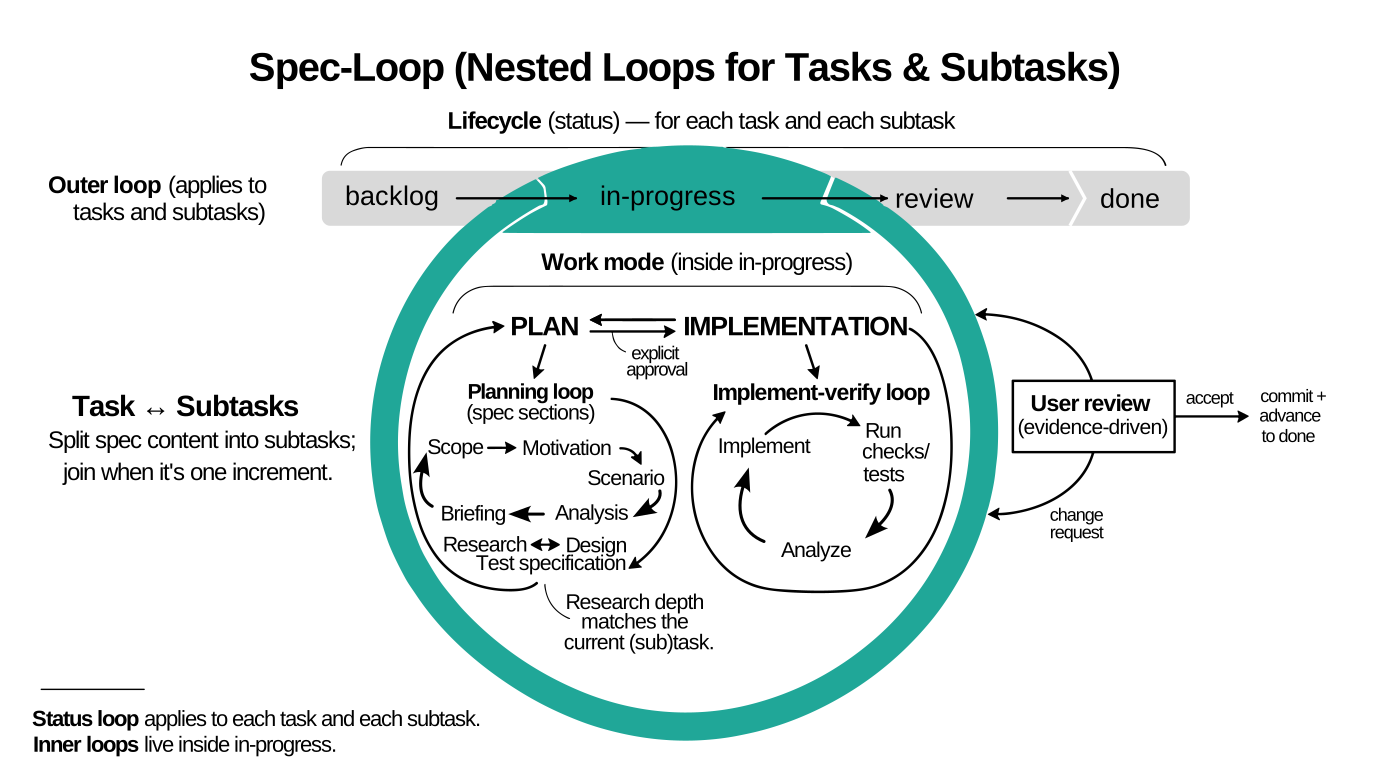
There are two common ways people use AI for coding.
Vibecoding: you describe intent, the model fills in the gaps, and you get a large diff with undocumented decisions. Review becomes archaeology. Tests are optional by accident.
Waterfall: you try to avoid that by writing a complete spec first. You can’t. Constraints appear during implementation. The spec inflates, then it either blocks change or gets ignored.
Spec Loop avoids both: write the next small spec, review it, then implement it with tests. Keep the spec local to the next step. Repeat until done.
Living project documents record current specifications, contracts, architecture, operations, shared language, and decisions. Spec Loop plans changes to affected documents with the code, completes them in the same increment, and includes them in review. Spec Loop does not require a project to create living documents when none are otherwise needed.
Projects with multiple living documents keep one list in an existing project instruction file or, by default, the root README. The list may point to individual documents or collections such as an arc42 document set. An existing project glossary remains active when it is the only living document.
When work is too large for one task, Spec Loop can use subtasks or multiple task files / backlog items. Implementation tasks and subtasks should be releasable unless the user explicitly opts out.
Spec Loop is a framework of reusable skills.
Living Project Documents
This section is this project's authoritative living-project-document list.
README.md is implicit because it contains the list.
AGENTS.md— project instructions; repository-wide agent rules.skills/— normative skill collection; Spec Loop workflow, format, and lifecycle behavior.docs/— user-facing documentation collection; explanations, governance, comparisons, studies, and tutorials.site/— documentation publication collection; site navigation and build behavior.
Getting Started
Install the skills with npx skills
Recommended path:
Install the core task-workflow skills together.
Ensure Node.js is available so npx works.
Install Spec Loop in the current project with:
npx skills add dpolivaev/spec-loop -s '*'
Variations:
-s '*'installs all shipped skills.- Remove
-s '*'to select skills interactively instead of installing the full bundle. That lets you skip the optional spec-loop-setup-doc-rendering and spec-loop-review-change skills, and skip spec-loop-write-glossary when your project will not use a project glossary. - Add
-gfor a global install. - Use
-g --allfor a global, non-interactive install for all supported agents.
For selective, single-agent, or other installation variants, see https://github.com/vercel-labs/skills.
Prepare task and glossary rendering
Spec Loop task files use embedded PlantUML diagrams and may also include Mermaid visual glossaries. Spec Loop project glossaries may include Mermaid diagrams. Prepare your editor for reviewing rendered task files and glossary files before continuing.
Ask the agent to use the spec-loop-setup-doc-rendering skill to prepare your editor preview setup.
If you do not want to use the skill and prefer manual setup, use these editor-specific references: VS Code-Based IDE Setup and JetBrains Setup Reference.
For example:
Please use the `spec-loop-setup-doc-rendering` skill to help me
prepare my editor for reviewing rendered Spec Loop task files and
glossary files.

My coding harness may run in a terminal, but I review files in
<VS Code, Cursor, another VS Code-based IDE, or JetBrains>.
When an end-to-end rendering check is useful, the skill should also suggest small Markdown and AsciiDoc probe files that exercise the relevant diagram types, including a class diagram.
If you review files in VS Code, Cursor, or another VS Code-based IDE,
the same extension IDs and settings apply. When your editor exposes a
supported CLI command, you can also run the helper script directly
instead of asking an agent to use the skill. You can either run it from
a local checkout or download the current main-branch copy directly from
setup-vscode-server-based.sh.
The script requires a supported editor CLI command on PATH (code,
code-insiders, cursor, code.cmd, code-insiders.cmd, or
cursor.cmd) and is intended for macOS, Linux, WSL, and Git Bash for
Windows. Other VS Code-based IDEs should apply the same extension IDs
and settings manually.
The helper automates only the server-based PlantUML preview path for supported VS Code-based IDEs together with the AsciiDoc extension used by Spec Loop glossaries. It does not automate the local-only PlantUML path or JetBrains setup.
From a local checkout:
bash skills/spec-loop-setup-doc-rendering/scripts/setup-vscode-server-based.sh --check
bash skills/spec-loop-setup-doc-rendering/scripts/setup-vscode-server-based.sh --apply
Without a local checkout:
curl -fsSLO https://raw.githubusercontent.com/dpolivaev/spec-loop/refs/heads/main/skills/spec-loop-setup-doc-rendering/scripts/setup-vscode-server-based.sh
bash setup-vscode-server-based.sh --check
bash setup-vscode-server-based.sh --apply
How to update
Project-level update:
npx skills update
Global update:
npx skills update -g
Manual fallback when npx is unavailable
If npx is not available, clone or download this repository and copy
the core task-workflow skills from skills/ into your agent's skills
directory. Keep that core bundle together:
- spec-loop-plan-task
- spec-loop-plan-work-breakdown
- spec-loop-clarify-task
- spec-loop-prepare-execution-approval
- spec-loop-implementation-flow
- spec-loop-write-adr
Install spec-loop-write-glossary when your project uses a project glossary.
Install spec-loop-setup-doc-rendering only if you want rendering setup or troubleshooting help.
Install spec-loop-review-change only if you need review of an existing change, whether as a high-level assessment, a file-wise walk-through, or both.
Which directory your agent uses is agent-specific. See https://github.com/vercel-labs/skills for agent-specific installation details.
Further Reading
- How Spec Loop Works — why the workflow scales to large codebases.
- Skills Overview — the skill catalog, reading path, and reference links.
- Diagram and Rendering Policy — PlantUML default, Mermaid fallback, and rendering guidance.
- Governance, Review, and Traceability — approval boundaries, review discipline, and traceability rules.
- AI Workflow Framework Comparison — workflow trade-offs compared with other frameworks.
- Tutorials:
License
Licensed under the MIT License. See LICENSE.
Origin
This framework was developed and applied in Freeplane.